

Some directory implementations use individual bits in an attribute to provide information about that attribute, such as the state of an account. You can apply a bit mask to an attribute.
This use case shows two Active Directory user stores that identify disabled user accounts. Each account has a different underlying schema.
Note: Review the advanced user attribute mapping examples, which detail how to use different attribute mapping types to identify the same user attribute across different directory types.
The following illustration details how two mask attribute mappings can create a common view of the same user information.
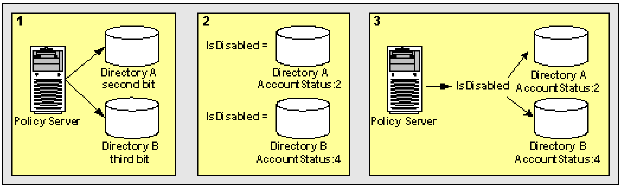
This results in two different views of the same user information.
IsDisabled results in a common view of disabled user accounts. You can reference IsDisabled when defining assertion attributes or NameID attributes that require the account status of users. The system has no concern for the directory-specific schema because the directories are operationally identical.
A bit mask attribute mapping tests the value of one or more bits by masking the values of the other bits in a user attribute.
A mask attribute mapping is defined as follows:
user_attribute_name:bit_mask
For example, assume that the user attribute is named AccountStatus. The attribute AccountStatus stores the states of the following three flags in a bit pattern:
|
Bit Pattern |
Flag |
|---|---|
|
00? |
account disabled? |
|
0?0 |
password expired? |
|
?00 |
gold member? |
When a bit equals one, the flag is TRUE. The table shows the results:
|
Bit Pattern |
Account Status |
|---|---|
|
000 (0) |
no flags are TRUE |
|
001 (1) |
account disabled |
|
010 (2) |
password expired |
|
100 (4) |
gold member |
|
011 (3) |
password expired, account disabled |
|
101 (5) |
gold member, account disabled |
|
110 (6) |
gold member, password expired |
|
111 (7) |
gold member, password expired, account disabled |
Note: Equivalent decimal values are shown in parentheses.
Assume that you only want to test whether a user is a gold member. To test this bit, select the bit pattern that corresponds to a gold member as the bit mask or 100 (binary) and specify it as 4 (decimal). The resulting mask attribute mapping is defined as follows:
AccountStatus:4
A bitwise AND operation on AccountStatus is performed on the bit mask and tests whether the result is equal to the bit mask. An equal result means the value of the tested bit is one and the flag is TRUE. The following table shows the results:
|
Account Status |
Bit Mask |
Result of Bitwise AND |
Gold Member? |
|---|---|---|---|
|
000 (0) |
100 (4) |
000 (0) |
FALSE |
|
001 (1) |
100 (4) |
000 (0) |
FALSE |
|
010 (2) |
100 (4) |
000 (0) |
FALSE |
|
011 (3) |
100 (4) |
000 (0) |
FALSE |
|
100 (4) |
100 (4) |
100 (4) |
TRUE |
|
101 (5) |
100 (4) |
100 (4) |
TRUE |
|
110 (6) |
100 (4) |
100 (4) |
TRUE |
|
111 (7) |
100 (4) |
100 (4) |
TRUE |
Note: Equivalent decimal values are shown in parentheses.
You can also use a bit mask to test the value of a bit set or more than one bit at a time. Assume that you want to know whether the account is disabled and the password has expired. To test these bits, specify a bit mask of 011 (binary) or 3 (decimal). The resulting mask attribute mapping is defined as follows:
AccountStatus:3
A bitwise AND operation on AccountStatus is performed on the bit mask and tests whether the result is equal to the bit mask. An equal result means the value of both tested bits is one and both flags are TRUE. The following table shows the results:
|
Account Status |
Bit Mask |
Result of Bitwise AND |
Both Flags Set? |
|---|---|---|---|
|
000 (0) |
011 (3) |
000 (0) |
FALSE |
|
001 (1) |
011 (3) |
001 (1) |
FALSE |
|
010 (2) |
011 (3) |
010 (2) |
FALSE |
|
011 (3) |
011 (3) |
011 (3) |
TRUE |
|
100 (4) |
011 (3) |
000 (0) |
FALSE |
|
101 (5) |
011 (3) |
001 (1) |
FALSE |
|
110 (6) |
011 (3) |
010 (2) |
FALSE |
|
111 (7) |
011 (3) |
011 (3) |
TRUE |
Note: Equivalent decimal values are shown in parentheses.
|
Copyright © 2013 CA.
All rights reserved.
|
|