

CA SiteMinder® Federation Standalone Installation and Upgrade Guide › Install CA SiteMinder® Federation Standalone › How to Run the CA SiteMinder® Federation Standalone Configuration Wizard › CA SiteMinder® Federation Standalone Deployment with CA SiteMinder® › Standalone Mode with the SiteMinder Connector at the Relying Party
Standalone Mode with the SiteMinder Connector at the Relying Party
If CA SiteMinder® Federation Standalone is communicating with an existing CA SiteMinder® environment in standalone mode, CA SiteMinder® Federation Standalone handles only federated requests.
To work with CA SiteMinder®, CA SiteMinder® Federation Standalone has to establish a CA SiteMinder® session with the Policy Server so that when the user requests CA SiteMinder®-protected resources, he is not rechallenged. The federated request is eventually redirected to the target web server, which is protected by a CA SiteMinder® Web Agent.
Note: CA SiteMinder® Federation Standalone and the CA SiteMinder® Web Agent need to share the same cookie domain in standalone mode.
The following figure shows a standalone mode architecture using the CA SiteMinder® Connector. This figure is from the perspective of the relying party.
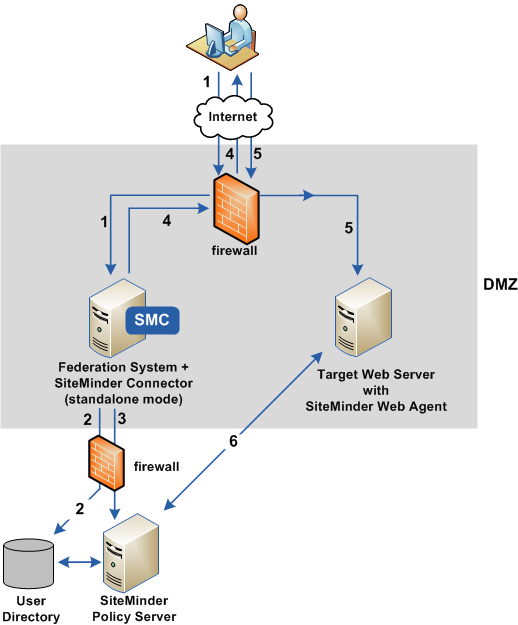
The previous figure shows the following communication flow at the relying party:
- A user requests a federated resource and is redirected to the relying party's assertion consumer service.
- Based on data in the assertion, CA SiteMinder® Federation Standalone authenticates the user, which includes communicating with the user directory to complete the user disambiguation process.
- The CA SiteMinder® Connector, as part of CA SiteMinder® Federation Standalone, contacts the custom authentication scheme at the CA SiteMinder® Policy Server. A CA SiteMinder® session ticket is created by the Policy Server, which it sends to CA SiteMinder® Federation Standalone. CA SiteMinder® Federation Standalone then creates a session cookie that includes the ticket. Establishing a CA SiteMinder® session ensures the user is not challenged later when accessing the target resource.
- CA SiteMinder® Federation Standalone returns a redirect response back to the user's browser.
- The browser redirects the user to the web server with the target resource, which is protected by the CA SiteMinder® Web Agent.
- The CA SiteMinder® Web Agent and Policy Server complete the authorization process.
After successful authorization, the target resource is presented to the user's browser.
Copyright © 2013 CA.
All rights reserved.
|
|