

At the asserting party, CA SiteMinder® Federation Standalone configured with the CA SiteMinder® Connector can use CA SiteMinder® for user authentication. After a successful authentication, the user must be redirected back to CA SiteMinder® Federation Standalone, which issues an assertion.
At the asserting party, CA SiteMinder® authenticates a user and then issues an SMSESSION cookie. When the user is sent back to CA SiteMinder® Federation Standalone, the presence of the SMSESSION cookie triggers the creation of the FEDSESSION cookie. The deployment mode (proxy or standalone) is not relevant in this case.
Note: If CA SiteMinder® Federation Standalone is operating in standalone mode, CA SiteMinder® Federation Standalone and the CA SiteMinder® Web Agent need to share the same cookie domain.
In a deployment with CA SiteMinder®, the user has to visit CA SiteMinder® first to authenticate. After authentication is successful, the web resource protected by CA SiteMinder® must send the user back to CA SiteMinder® Federation Standalone. A deployment with the CA SiteMinder® Connector is not the same as the CA SiteMinder® Federation Standalone feature called delegated authentication, which also allows a web access management system like CA SiteMinder® to handle user authentication. What distinguishes delegated authentication from a CA SiteMinder® Connector deployment without delegated authentication is that the user does not have to initiate authentication at CA SiteMinder®.
Delegated authentication lets CA SiteMinder® Federation Standalone initiate an authentication request and then redirect the user to CA SiteMinder®, enabling the redirect to occur automatically, assuming the feature is properly configured. To redirect the user back to CA SiteMinder® Federation Standalone after a successfully authenticating the user, the resource that CA SiteMinder® protects must be configured with a mechanism to redirect the user back to CA SiteMinder® Federation Standalone. The redirect must include all data that the protected resource received. For example, if the SiteMinder-protected resource received several query parameters from the initial authentication request, it must redirect the user back to CA SiteMinder® Federation Standalone with these same query parameters.
The following figure shows an architecture using the CA SiteMinder® Connector at the asserting party.
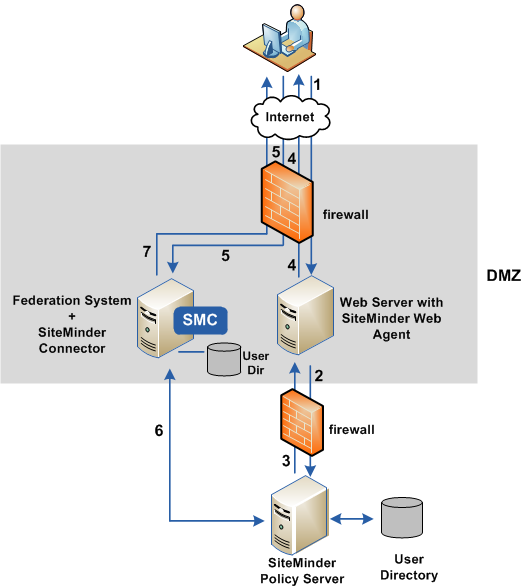
The previous figure shows the following communication flow at the asserting party:
|
Copyright © 2013 CA.
All rights reserved.
|
|