

Specific federation tasks require validation for certificates in the certificate data store. These tasks include protecting the HTTP-Artifact back channel, verifying SAML messages, and encrypting SAML messages.
To check the validity of certificates, the certificate data store can use an OCSP service. OCSP uses an HTTP service that is provided by a Certificate Authority (CA) to supply the certificate revocation status on demand.
By default, CA SiteMinder® Federation Standalone does not check the revocation status of a certificate in the certificate data store. To check the revocation status through an OCSP responder, enable OCSP through the Administrative UI. When enabled, the OCSP service checks the revocation status for configured OCSP responders every 5 minutes. This default frequency is configurable.
The following figure shows the OCSP configuration steps:
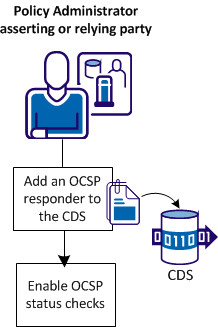
The configuration process is as follows:
Set up the following components to use OCSP for certificate validation:
Obtain these certificates from your CA in a communication that is separate from an OCSP transaction.
CA SiteMinder® Federation Standalone can work with any OCSP response that is signed using SHA-1 and the SHA-2 family of algorithms (SHA224, SHA256, SHA384, SHA512).
The OCSP responder can include the signature verification certificate with the response. CA SiteMinder® Federation Standalone then validates the certificate and the response signature with the trusted certificate in the certificate data store.
If a signature verification certificate is not in the response, CA SiteMinder® Federation Standalone verifies the signature with the certificate or collection of certificates in the certificate data store.
You configure OCSP in the Administrative UI and are required to specify the location of the certificate or the collection of certificates.
Add an OCSP responder record to the certificate data store for each responder with which CA SiteMinder® Federation Standalone interacts.
Follow these steps:
The OCSP Configuration List displays.
Note: Click Help for a description of fields, controls, and their respective requirements.
An OCSP responder record is now in the certificate data store.
Add an OCSP responder record to the certificate data store for each responder with which CA SiteMinder® Federation Standalone interacts.
Follow these steps:
The CDS Configuration List displays.
OCSP status checks are enabled.
You can complete two other tasks to manage certificate validity checking (CRL or OCSP):
The certificate cache refresh period indicates how often the certificate data store updates the certificate data in the policy store. Certificate data is cached in memory to improve CA SiteMinder® performance. Refresh the information in memory so that the data is current.
The default revocation grace period is the delay from when a certificate is revoked and the time the certificate becomes invalid. During the grace period, the system can use a revoked certificate before it becomes invalid. After the certificate becomes invalid, it is no longer active and CA SiteMinder® Federation Standalone cannot use it.
If you do not specify a value for the CRL or OCSP responder grace period when adding these components, CA SiteMinder® Federation Standalone uses the default grace period. The individual grace period settings for a CRL or OCSP take precedence over this default grace period value.
Follow these steps:
The Certificate Settings dialog displays.
Note: Click Help for a description of fields, controls, and their respective requirements.
|
Copyright © 2014 CA.
All rights reserved.
|
|