

This scenario, Add Hosted Systems, involves a system administrator whose company's IT infrastructure includes a domain manager that publishes information about operating systems. The operating systems are Linux-based operating systems. They are either hosting operating systems (which implies they run a virtual computer or computers) or hosted operating systems (which implies they run on a virtual system). The domain manager also publishes IsHostFor relationship between hosting and hosted operating systems. The system administrator wants to create an unmanaged relationship policy. The policy ensures adding a hosting operating system to a service also adds all hosted operating systems.
The system administrator creates a new unmanaged relationship policy using the Service Discovery Policy Editor wizard:
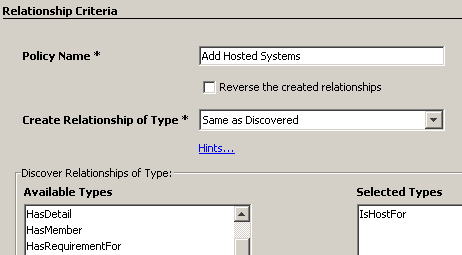
The system administrator completes the Relationship Criteria page with the following values:
Policy Name: Add Hosted Systems
Create Relationship of Type: Same as Discovered
Discover Relationships of Type: IsHostFor
The system administrator clicks Add and the resulting relationship criteria appear as shown in the following graphic:
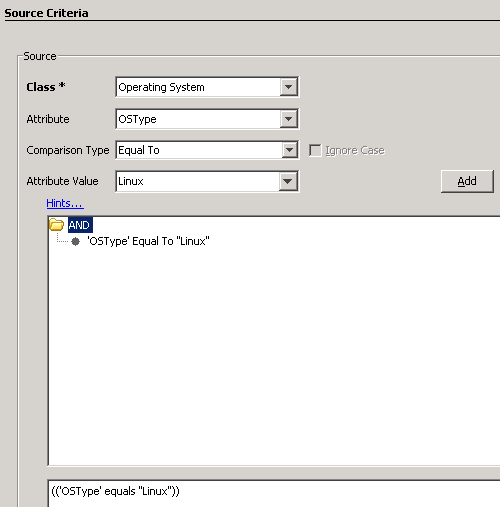
The system administrator completes the Source Criteria page with the following values:
Class: Operating System
Attribute: OSType
Comparison Type: Equal To
Attribute Value: Linux
The system administrator clicks Add and the resulting source criteria appear as shown in the following graphic:
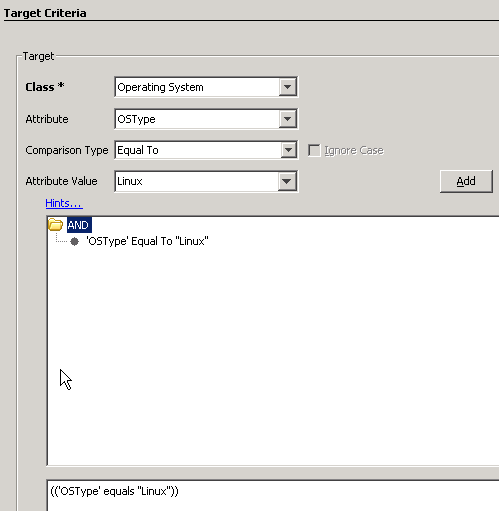
The system administrator completes the Target Criteria page with the following values:
Class: Operating System
Attribute: OSType
Comparison Type: Equal To
Attribute Value: Linux
The system administrator clicks Add and the resulting target criteria appear as shown in the following graphic:
Note: This scenario does not require any match criteria.
The system administrator selects All services so that all services with matching OperatingSystem CIs are considered for creating the relationship.
The unmanaged relationship policy appears on the Confirm page as follows:
Unmanaged Relationship Policy 'Add Hosted Systems' creates
relationships with
SEMANTIC
	Same as Discovered
BETWEEN
    Operating System with properties
    (
        'OSType' equals "Linux"
    )
AND
    Operating System with properties
    (
        'OSType' equals "Linux"
    )
SCOPED TO
    (
        All services
    )
BASED ON SEMANTICS
    (
       IsHostFor
     )
|
Copyright © 2013 CA.
All rights reserved.
|
|