

The company is adding new enterprise software that requires adding multiple databases. The company is also planning on adding additional databases in the future.
The system administrator wants to automatically create relationships between database instances and their respective tablespaces. When a new database comes online, the system administrator wants the relationship creation automated also.
The system administrator creates a new automatic relationship policy using the Service Discovery Policy Editor wizard:
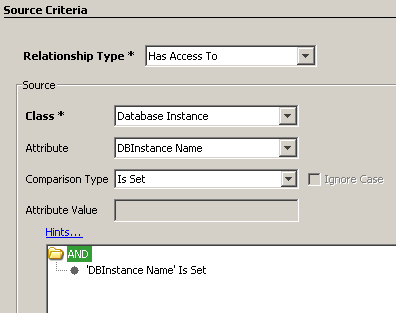
The system administrator completes the Source Criteria page with the following values:
Relationship Type: Has Access To
Class: Database Instance
Attribute: DBInstanceName
Comparison Type: Is Set
The system administrator clicks Add and the resulting source criteria appear as shown in the following graphic:
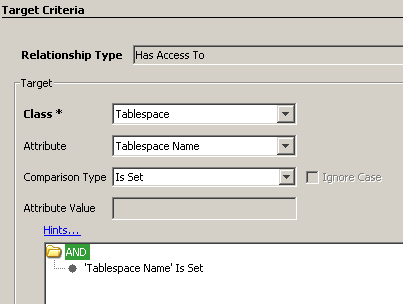
Class: Tablespace
Attribute: Tablespace Name
Comparison Type: Is Set
The system administrator clicks Add and the resulting source target criteria appears as shown in the following graphic:
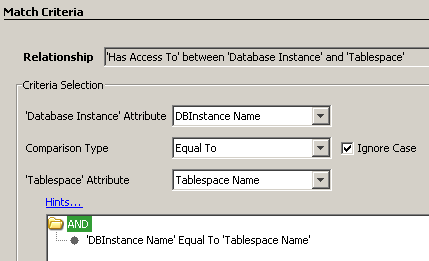
'Database Instance" Attribute: DBInstance Name
Comparison Type: Equal To
'Tablespace' Attribute: Tablespace Name
The system administrator clicks Add and the resulting match criteria appears as shown in the following graphic:
The system administrator selects All services so that all services are considered for relationship creation.
The automatic relationship policy appears on the Confirm page as follows:
Automatic Relationship Policy 'Has Access To'
BETWEEN
    Database Instance with properties
    (
        'DBInstance Name' is set
    )
AND
    Tablespace with properties
    (
        'Tablespace Name' is set
    )
WHEN
    (
        'Database Instance.DBInstance Name' equals (ignore case) 'Tablespace.Tablespace Name'
    )
SCOPED TO
    (
        All services
    )
|
Copyright © 2013 CA.
All rights reserved.
|
|