

As an administrator, you use the Service Discovery Policy Editor to create and manage policies that automatically create relationships based on policy criteria.
Automatic relationship policies are based on the following:
Defines the type of relationship to create.
Defines the CI type to use as the source of the relationship with optional attribute-based criteria.
Defines the CI type to use as the target of the relationship with optional attribute-based criteria.
Defines how the source and target CIs must relate (based on attribute values) for the policy criteria to match and create a relationship between the CIs.
Defines under which services the relationships are created.
The automatic relationship policy creates a new relationship in the service that automatically adds the target CI to the service. Only the source CI needs to pre-exist in the service.
A CI can become part of the service through various ways; for example:
Note: When a policy specifies a class name (for example, class=ComputerSystem), the policy applies to the CIs of that class and also to its subclasses (as defined by the USM Schema Type hierarchy). For example, in the case of ComputerSystem, the policy would also apply to VirtualSystems.
When the specified source CI appears in a service and the policy criteria are met, Service Discovery adds a relationship to all the specified target CI in the service. You can scope the policies to a subset of service models or apply them to all service models in which the source CI exists.
For example, you can create an automatic relationship policy that creates relationships between ComputerSystem CIs and all RunningSoftware contained on the ComputerSystem based on matching ComputerSystem's and RunningSoftware's IP addresses.
You can create one policy at a time for a relationship. Multiple policies for each relationship are supported, but you must create them in separate operations.
Note: Service Discovery policies support only USM-Core CIs.
Use this scenario to guide you through the process:
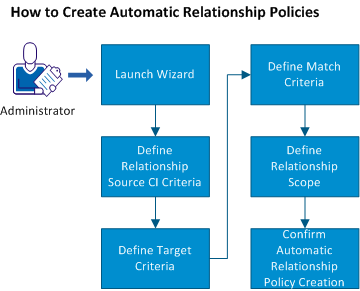
You can also read a scenario that provides an example for creating automatic relationship policies.
|
Copyright © 2013 CA.
All rights reserved.
|
|