

The company is converting its data center to virtual resources over time. The system administrator wants a service container for all existing virtual machines and virtual machines that come online in the future.
The system administrator creates a dynamic service policy that automatically puts all virtual systems by vendor VMware, Inc. under a service.
The system administrator creates a new dynamic service policy using the Service Discovery Policy Editor wizard:
The system administrator completes the Define Service page as follows:
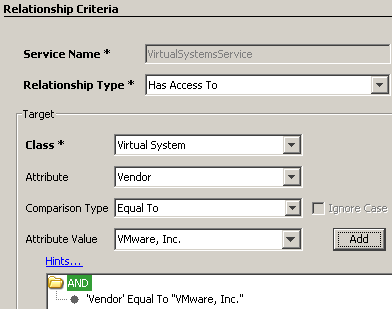
Service Name: VirtualSystemsService
Relationship Type: Has Access To
The system administrator then completes the Target fields:
Class: Virtual System
Attribute: Vendor
Comparison Type: Equal To
Attribute Value: VMware, Inc.
The system administrator clicks Add and the criteria appear as shown in the following graphic:
The dynamic services policy appears on the Confirm page as follows:
Dynamic Service Policy 'VirtualSystemsService'
WITH
    relationship 'Has Access To'
FOR
    Virtual System with properties
    (
        'Vendor' equals "VMware, Inc."
    )
|
Copyright © 2013 CA.
All rights reserved.
|
|