

Because one of the company's enterprise regions is located in a specific subnet, the system administrator wants to create dynamic service policy to collect the hardware resources from that region and add to a service. This provides the system administrator with a consolidated view of that region. The system administrator could then model the relationships among the resources or set up automatic relationships.
Because all hardware resources in the region begin with the same IPV4 address (10.0.21.x), the system administrator creates a dynamic service policy for all IPV4 addresses starting with 10.0.21.
The system administrator creates a new dynamic service policy using the Service Discovery Policy Editor wizard:
The system administrator completes the Define Service page as follows:
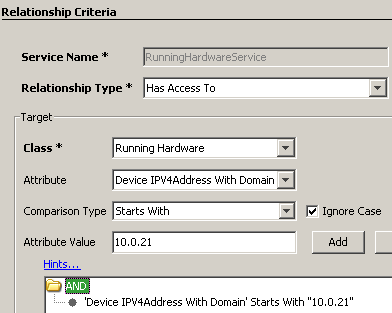
Service Name: RunningHardwareService
Relationship Type: Has Access To
The system administrator then completes the Target fields:
Class: Running Hardware
Attribute: Device IPV4Address With Domain
Note that all USM properties available are available except the following:
Comparison Type: Starts With
Attribute Value: 10.0.21
The system administrator clicks Add and the criteria appear as shown in the following graphic:
If the system administrator wanted to put a dynamic service CI with a different class, the system administrator can define another policy which has the same service name and relationship type, but a different class.
The dynamic services policy appears on the Confirm page as follows:
Dynamic Service Policy 'RunningHardwareService'
WITH
    relationship 'Has Access To'
FOR
    Running Hardware with properties
    (
        'Device IPV4Address With Domain' starts with (ignore case) "10.0.21."
    )
|
Copyright © 2013 CA.
All rights reserved.
|
|