

This procedure describes how to define XML elements to CA Process Automation using the Add custom Remedy fields mapping component of the Remedy Optional Parameters page in CA Process Automation. You can use this approach when the field is populated with static text or an available CA SOI alert attribute.
Important! Use only one of the methods for adding fields. Do not attempt to combine mapping fields and adding custom code.
Follow these steps:
The Remedy Custom Parameters page opens.
The following displays:
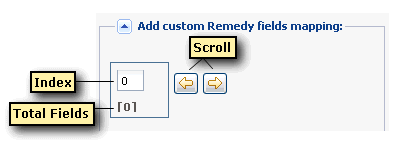
The + and x icons display.
The Add Custom Remedy Fields pane appears. The total number of fields increases by one. Because the index starts at zero, an index value of zero represents the first element.
Specifies the name of the XML element that you created in BMC Remedy web services. Enter the fields in the same sequence as they exist in BMC Remedy web services. This value is stored in the Tag Array named Keys.
Specifies the static text for this field, or the CA SOI alert attribute value. Enter a static value or select the CA SOI alert attribute value from the drop-down list. This value is stored in the ValueArray.
Note: Currently, the only dateTime attribute available is creation_date. The BMC Remedy field for dateTime has the following format: yyyy-MM-ddThh:mm:ss-tz:tz. The tz:tz values are the hh:mm of time zone information.
 to advance to the added element.
The value for the total number of fields and the index value increase by one.
Important! The fields must exist in the same sequence as they exist in BMC Remedy.
The Start Request pane opens.
The request displays on the Start Request Instances pane.
A State value of Completed indicates a successful connection.
|
Copyright © 2013 CA.
All rights reserved.
|
|