

Severity indicates the condition of a CI as reported from the domain manager to CA SOI through alerts. If multiple domain managers send alerts for the same CI, the highest severity is used. CI severity helps determine the service impact by propagating the impact of the condition to related CIs in the service model according to propagation settings.
The following table describes each severity:
|
Severity |
Color |
Description |
|---|---|---|
|
Normal |
Green |
Operational |
|
Minor |
Yellow |
A nominal displacement of CI function that can require an inspection |
|
Major |
Orange |
A serious causal change typically leading to degradation of function |
|
Critical |
Red |
High probability of imminent failure and severe degradation of service |
|
Down |
Burgundy |
The CI is incapable of providing function or service |
Color-coded icons on the Operations Console indicate CI severity (the color-coded icons for services indicate the service impact). Alerts in the Contents pane have the color corresponding to their severity. The Navigation pane also represents severity in columns next to services and CIs. The following graphic shows that each column lists the number of items with the corresponding severity (represented by the colors in the previous table).
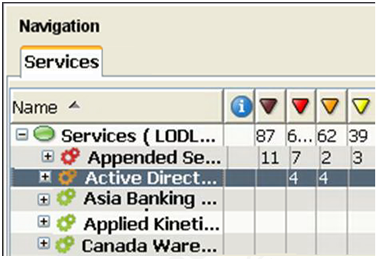
Note: If no alerts are raised for a CI, its severity is green even if the device contains child CIs with different severities. Also, groups are simply containers and would not usually have alerts. You can expand the tree and can follow the numbers to the row that lists the item whose severity you are looking for.
|
Copyright © 2013 CA.
All rights reserved.
|
|