

CA Process Automation uses a version control system that tracks your changes to the objects in your library. The version tracking system always maintains a single current version for each object. When you open an object, the application automatically uses the object that you designated as the current version. The application retains other versions of an object for backup or archive. You can open archived versions of an object to view, edit, or designate as the current version. The object owner or another user with sufficient permission can change which version is the current version.
You can check out then edit any version of an object. When your edits are complete, you can check in changes either to that version or to a new version of the object. To prevent users from changing a specific version, you can designate it as a baseline version. A baseline version can be used like any other version. You can also check out a baseline version and edit it, but you can only check in the object as a new version. Baseline versions are a benchmark or template for further development.
To release a new version of a process with all of its components, set the release version attribute for the process and each associated object. The release version typically identifies a version of an object that you deploy to a production environment. CA Process Automation maintains the release version attribute that was set before export in the import environment. You set a release version attribute for each object, add each object to the folder, and initiate the export of the folder. If you export the folder as a content package, the release version is nonmodifiable in the production environment. The import process automatically baselines the release version of a content package to prevent users from checking in changes in the imported version.
|
Item: |
Description: |
|---|---|
|
|
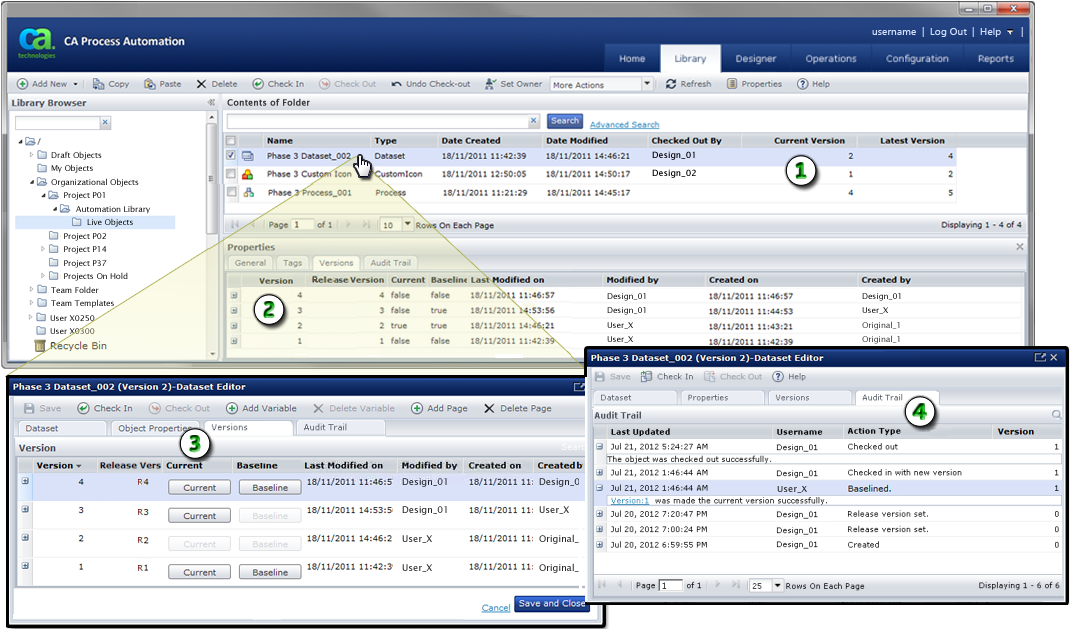
Object Versions: For each object, the library browser displays the user who checked out the object and the current and latest object versions. In this example, the current version of the selected dataset is 2, which is the version that user Design_01 checked out. The latest version of the object is version 4. |
|
|
Versions Tab of the Properties Panel: The Versions tab of the Properties panel lists the original and all subsequent versions of an object. You can see which version is current, which version or versions are baselines, and creation and modification information. The Versions tab of the Properties panel also provides an editable Release Version field. Optionally, you can take the following action:
|
|
|
Versions Tab in an Object Editor: When you open or edit an object, the Versions tab lets you select a single current version and one or more baseline versions. The other information is the same as the information displayed in the Properties panel. |
|
|
Audit Trail Tab in the Object Editor: The Audit Trail tab provides a history of all changes to each automation object. |
|
Copyright © 2014 CA.
All rights reserved.
|
|


