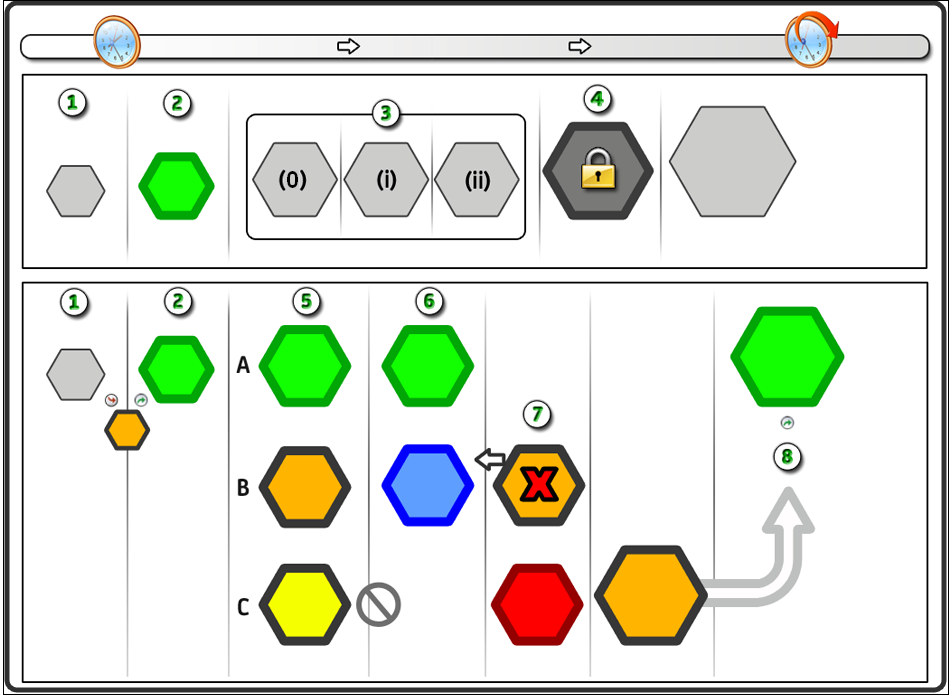
Refer to the following graphics and examples to learn the essential concepts about working with versions.
|
Item:
|
Description:
|
|

|
Typical Versioning Sequence: A new automation object begins at  version 0. The object is checked out as version 0. The object is checked out as  working version 0, with the option of applying pending changes to the same version 0 or new version 1. working version 0, with the option of applying pending changes to the same version 0 or new version 1.
|
|

|
Current Version: In this typical sequence, working version 0 is checked in as new version 1. The new version is also typically designated as the  current version. The current version is the one that is used when the process actually runs. The original version 0 is now considered just a backup or archive. current version. The current version is the one that is used when the process actually runs. The original version 0 is now considered just a backup or archive.
|
|

|
Changes Applied to the Same Version: In this example, version 2 is checked out multiple times. Each time, the user has elected to apply the changes to the same version rather than create a new one. Although changes were made in working versions 3(0), 3(i), and 3(ii), the user has decided to group them all together into the same single version. The user cannot go back to view the object in between changes 3(0) and 3(i). No separate version exists to go back to.
|
|

|
Baseline Version: Version 4 has been designated by the user as a  baseline version. Any checked-out working version must be checked in as a new version, version 5. When you specify one or more baseline versions, you are essentially locking each version. This practice prevents any modifications to the actual baseline versions. They can only be used as templates or ancestor class objects to facilitate the creation of new versions. baseline version. Any checked-out working version must be checked in as a new version, version 5. When you specify one or more baseline versions, you are essentially locking each version. This practice prevents any modifications to the actual baseline versions. They can only be used as templates or ancestor class objects to facilitate the creation of new versions.
|
|

|
Current, Working, and Open Versions: current version 5 has three simultaneous branches users might follow. In branch A, its changes are applied as new and current version 6. In branch B, working version 5 can be checked in as  new version 6, with version 5 remaining as the current version. In branch C, the user elects to new version 6, with version 5 remaining as the current version. In branch C, the user elects to  open version 5. The user can view the version but cannot save any changes to it. open version 5. The user can view the version but cannot save any changes to it.
|
|

|
Multiple Users: While running processes use current version 6, it is possible for the object to also be checked out to user 1 with pending changes in working version 7. While running processes use current version 6, the latest changes to the object may be made by user 2 and reflected as  latest version 7. latest version 7.
|
|

|
Discard Working Version: The changes to  working version 7 can be discarded. Similar to an Undo Checkout operation, this rolls back the object to the last checked in version. working version 7 can be discarded. Similar to an Undo Checkout operation, this rolls back the object to the last checked in version.
|
|

|
New Current Version: The latest version 7 can be checked out as working version 7. During check-in, the user can elect to make it the new current version 8.
|