

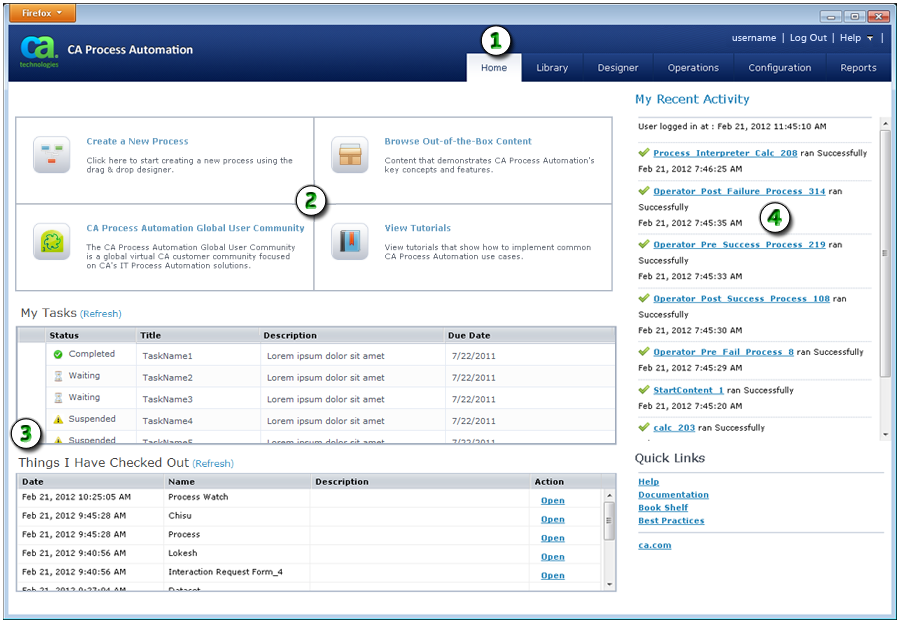
Use this page as a convenient starting point and personal dashboard for your CA Process Automation work session. Available features are highlighted in the following example.
|
Item: |
Description: |
|---|---|
|
|
Home Tab: Click the Home tab to view the Home page. The Home page appears when you log in to CA Process Automation. |
|
|
Quick Buttons: CA Process Automation provides options to help you save time and start working. The lower right corner of the page also lists Quick Links. |
|
|
Tasks and Automation Objects: CA Process Automation displays tables that list your tasks and the automation objects you have checked out (that is, the working versions of objects). |
|
|
My Recent Activity: A list of recent process activity appears sorted by date and time. Click a link to open the process instance. |
|
Copyright © 2014 CA.
All rights reserved.
|
|


