

Example
To export content with a relative path, use RESTful services.
Follow these steps:
Username: (Catalyst user name)
Password: (Catalyst password)
ClaimName: Username
ClaimValue: pamadmin
ClaimName: Password
ClaimValue: pamadmin
CatalystBrokerURL: "https//hostname:7443/ucf/BrokerService"
MdrProduct: "CA:00074 (CA Process Automation)"
MdrProdInstance: "CA:00074:01"
Operation Category: "CA Process Automation"
Operation: Export
FolderName: Absolute path of the folder (or) content. For example, "/GetOSInfo".
ExportAsContentPackage: Export folder as Content Package with absolute or a relative path. Takes true or false value. By default, the value is set to false.
IsAbsolute: Select "false" to export the content with a relative path. If you select "true", content will be imported with the absolute path.
ExportLocation: Server location to export the .xml file. For example: "c:\\export_import_test\\export_test.xml".
OverwriteFile: Select whether to overwrite the existing file in the given location.
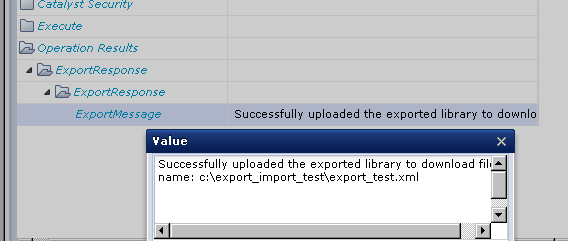
In the following illustration, a successful export message displays with exported location.
|
Copyright © 2014 CA.
All rights reserved.
|
|