

Develop Your First Java Application in 20 Minutes › Panel Designer › Add Spin Controls
Add Spin Controls
The spin control lets the end user increase or decrease the value in the fields by clicking the arrow buttons instead of typing a value in the edit box.
To modify the two date fields so that they include spin controls
- On the Design window, hold down Ctrl and click one of the edit controls of the date fields. Holding down Ctrl causes the control to be selected instead of the region in which it is contained.
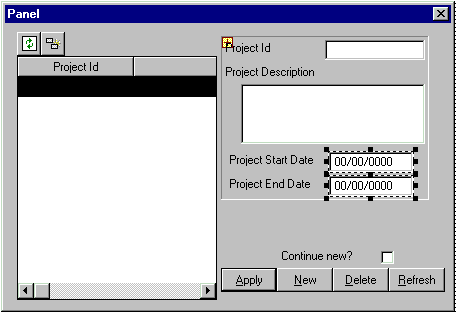
- Hold down Ctrl and Shift at the same time and click the other date control. Both date controls should now be selected and the Design window should look like this:
- In the Property Sheet, locate the Spin Control property and set it to Yes.
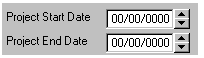
Notice how you can select multiple elements on a panel and change properties for all of them.
- From the File menu, click Save.
- Close the Design Window.
This closes the whole Panel Designer.
Copyright © 2014 CA.
All rights reserved.
|
|