

To specify actions on selected panels, pull down the Panel menu and click the menu item you want. The Panel menu lets you:
You open a panel either to view it for modifications or to connect it to a node for displaying real-time data.
Click the panel name to select a panel. Pull down the Panel menu and click the Open menu item. Performance Manager displays the selected panel.
You can also open a panel by double-clicking on the panel name.
Specifies a panel name change.
Click the Create menu item from the Panel menu and Performance Manager displays the Panel Name dialog, as shown in the following screen:
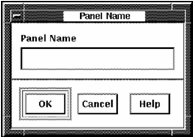
Type a panel name and click the OK button.
When you enter a panel name, the Panel Name dialog is removed and the name you specified is listed in the Instrument Panel Directory of the Panel Manager.
Click a panel name to select a panel. Pull down the Panel menu and click the Copy menu item. The Copy Panel dialog is displayed, as shown in the following screen:
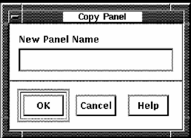
Type the new panel name and click the OK button.
Click a panel name to select a panel. Pull down the Panel menu and click the Delete menu item. The following message box is displayed, as shown in the following screen:
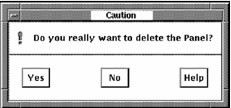
If you click OK, that panel is deleted.
Enable or disable a panel to startup automatically. When you enable automatic startup for a panel, it will be displayed and an attempt to connect will be made when you invoke the Real-time Display software. You can have several panels set for automatic startup.
The Instrument Panel Directory is updated. The label /auto_startup is appended to the panel name.
The Instrument Panel Directory is updated. The label /auto_startup appended to the panel name is removed.
Enable or disable a panel to connect automatically. When you enable automatic connection for a panel, it will to connect when you open the panel. You can have several panels set for automatic connection.
The Instrument Panel Directory is updated. The label /auto_connect is appended to the panel name.
The Instrument Panel Directory is updated. The label /auto_connect appended to the panel name is removed.
|
Copyright © 2008 CA.
All rights reserved.
|
|