Previous Topic: Specify Actions on PanelsNext Topic: How You Edit the Panel Instruments


Terminate the Session

To end a DECwindows session

  1. Pull down the File menu in the Panel Manager window and click the Exit menu item.

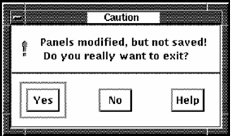
    If you have modified panels, Performance Manager displays the following message:

  2. Click Yes and your changes are not saved.
    OR
    Click No and the exit process is aborted.
  3. To save a panel, use the Save or Save As... menu entry in the panel.

    See the section Set the Panel Options section for more information about saving a panel.