

The following figure shows the class selection fields:
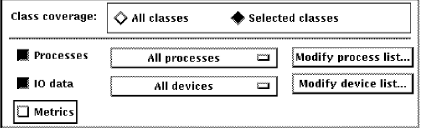
The Class Coverage section allows you to specify which major areas of performance data should be collected. While the CPD cannot be limited, other collection definitions can be limited to only those classes of data needed for special-purpose analysis.
The toggle buttons enable you to choose all of the following or selected classes:
Turn on this toggle button to collect all classes of data.
Turn on this toggle button to choose which classes of data you wish to collect: processes; IO data; or metrics.
Turn on this toggle button to collect Process data or to collect process data for specified processes.
Turn on this toggle button to collect IO data or to collect IO data on specified devices.
The Metrics field enables you to choose whether or not to collect a summary set of system metrics including such data items as memory utilization, CPU, and I/O parameters.
When you select the collection of process data, the All Processes option is collected by default. If you modified the process list, the menu is revised to reflect the type of coverage list (include or exclude) and the count of specified processes. Clicking this menu displays the correct list. This menu provides a convenient way to view the coverage list.
Click this button to specify a list of processes in the Collection Coverage List box. You specify a list of processes to be included in collection or excluded from collection.
When you select the collection of IO data, the All Devices option is collected by default. If you modified the device list, the menu is revised to reflect the type of coverage list (include or exclude) and the count of specified devices. Clicking this menu displays the correct list. This menu provides a convenient way to view the coverage list.
Click this button to specify a list of devices in the Collection Coverage List box. You specify a list of devices to be included in collection or excluded from collection.
For Process and Disk classes, you can collect data for specific lists of items or exclude lists of items, as shown in the following example:
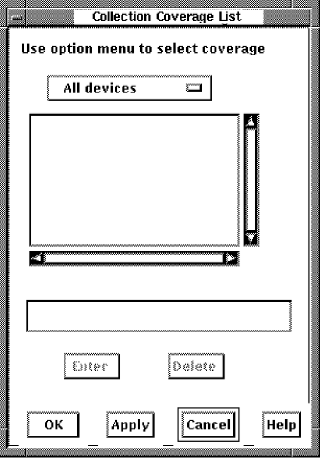
To create a list of processes
The displays All processes or one of the other options.
To add a process name
The name appears in the list box and be cleared from the text entry field.
To delete a name
The name is removed from the list box. To remove multiple names, click each name and then click the Delete button.
To create a list of devices
This which displays All devices or one of the other options.
To add a device name
The name appears in the list box and be cleared from the text entry field.
To delete a name
The name is removed from the list box. To remove multiple names, click the names and then click the Delete button.
The following figure shows a list of processes for which no data is to be collected:
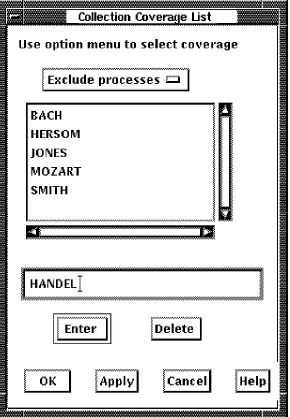
The type of list being managed cannot be converted. For example, an include processes list cannot become an exclude processes list. All list entries must be deleted before the coverage list type can be changed.
|
Copyright © 2008 CA.
All rights reserved.
|
|