

To specify or redefine a PSDC$DATABASE definition, pull down the Customize menu and release on the PSDC$DATABASE definition . . . menu item. DECwindows Motif displays the Set Database dialog box. This box allows you to redirect editing and review of dump reports to an alternate database area. You can also redirect performance analysis to an alternate area if you have the Performance Manager software, as shown in the following example:
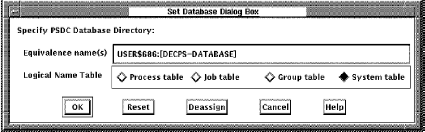
The translation of the lowest level definition is displayed, along with a toggle setting indicating the logical name table in which it is defined.
To remove a definition, click deassign. The dialog box is removed, and the definition at the next highest level goes into effect, possibly reloading a schedule and parameter file.
To create a new definition, click a toggle to specify which logical name table the definition should be placed in and type in the new definition. Click OK when done. The dialog box is removed and any new schedule and parameter files are loaded. There must be at least one definition of PSDC$DATABASE defined for the interface to run.
|
Copyright © 2008 CA.
All rights reserved.
|
|