

The <AttributeList> section defines the configuration or performance metrics you want to collect for your metric family. Even if many attributes are available for a device type, plan carefully which attributes are important for monitoring your infrastructure. The three common uses for attribute data are as follows:
Each attribute can include the following tags:
A unique internal name for the attribute (in qualified name format).
This text appears as a tooltip in your CA Performance Center views.
This tag determines how your attributes are identified in reports and CA Performance Center dashboards.
The data type of the attribute. The most-used types are Integer, Long, Double, String, or ObjectID.
When set to True, Data Aggregator collects this metric data during each polling cycle. When False, the data is collected only upon discovery of an item.
The attribute provides either scalar or table data. Consider the following definitions:
Note: If this tag is True for an attribute, it must be set to True for every attribute in the same attribute list. In this case, it is required to define an Indexes (ObjectID type) and a Names (String type) attribute in the list.
This tag indicates that the attribute value is stored in the database table. For configuration metrics, set this tag value to False.
This tag specifies to calculate either a summation or an average of the individual poll value. This tag is required when <Polled> and <IsDbColumn> are set to True.
When set to True, a baseline is calculated for this attribute and you add a corresponding baseline definition in the <BaselineList> section.
The following tags are also required when you include <RollupStrategy> or when <Baseline> is set to True:
Indicates whether to calculate a baseline for this attribute. If it is set to True, a corresponding BaselineList definition must exist.
Indicates whether to calculate the maximum of this attribute during rollup. Creates a 'max_' column in the database table.
Indicates whether to calculate the minimum of this attribute during rollup. Creates a 'min_' column in the database table.
Indicates whether to calculate the variance of this attribute during rollup. Creates a 'var_' column in the database table.
Indicates whether to calculate the standard deviation of this attribute during rollup. Creates a 'std_' column in the database table.
Specifies the operation to perform every cycle during rollup of the individually polled values. The value can be 'Sum' or 'Avg' for calculating either a summation or an average.
This tag indicates that the attribute can be used for monitoring profile filtering. When applying a filter, an attribute with this tag becomes available for the filter expression.
Note: For more information about each XML tag, see the inline documentation provided in the MetricFamily.xsd and Component.xsd files. For code examples, see the ProcessInfoMFWithComponent.xml file. This example file defines a metric family for gathering process metrics.
The Attribute List lists the attributes that are collected and stored in the database table. The following information describes the elements that you use in the AttributeList section:
Specifies the unique internal name that is used for naming the DB column. Name is specified in QName format:
{URI}FamilyName.AttrName
Note: This name is never exposed externally. To display an attribute name in the user interface, use the AttributeDisplayName element.
Specifies the value that appears in operator and administrator interfaces. AttributeDisplayName can be localized into multiple languages.
Displays the attribute description in the user interface. The description also displays in tool tips when hovering over the attribute name.
Indicates the data type of this attribute. The most frequently used data types are Integer, Long, Double, String or ObjectID.
Indicates whether the attribute is polled. If it is set to False, it is only accessed during discovery.
If it is set to True, retrieves the attribute from a table. Component items are also created for each row in the table.
Note: Set the property to True for every attribute in the metric family that is stored in the database when you set this property to True for any attribute.
Stores its value in the database table. IsDbColumn is typically used for attributes that are polled every cycle and are included in reports.
Note: If you did not use ProcessInfoMFWithComponent.xml but downloaded an XML file from http://host:port/genericWS/metricfamilies/<name> to get started with your metric family, delete RollupExpression and Units nodes because they are deprecated.
In the following illustration, the Indexes, Names, and Descriptions attributes exist for any metric family:
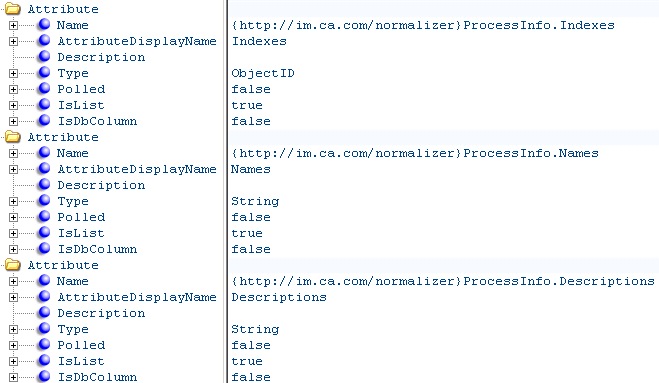
Any supporting vendor certification can provide URIs exposed by the metric family, such as:
{http://im.ca.com/normalizer}Name.Indexes
{http://im.ca.com/normalizer}Name.Names
{http://im.ca.com/normalizer}Name.Descriptions
In the following illustration, for most attributes only the value is stored in the database. No further processing, such as evaluation of a baseline, is performed.
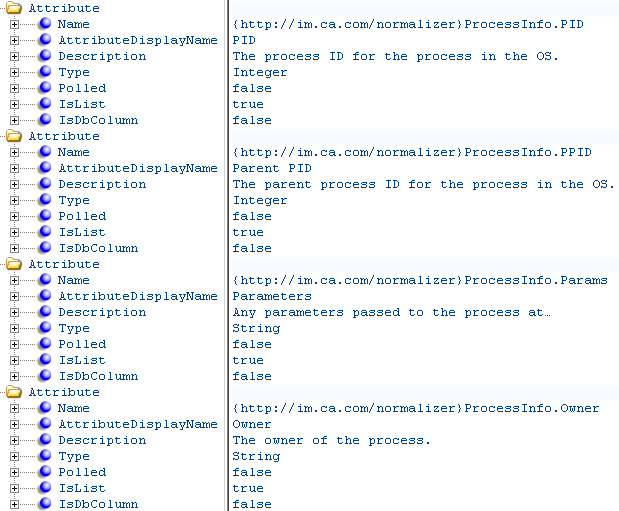
A supported vendor certification must provide some metric family-exposed URIs in the following form:
{http://im.ca.com/normalizer}Name.AttributeName
|
Copyright © 2015 CA Technologies.
All rights reserved.
|
|