

The basic properties of your custom metric family help to distinguish it from other custom metric families you create. Also, these properties indicate where to store your collected metric data.
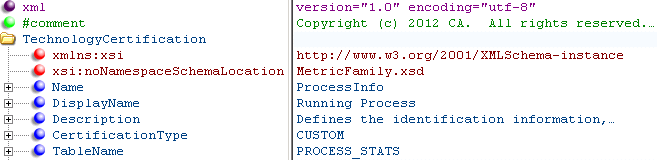
The tags included in this section of the XML file are as follows:
Specifies the metric family name. Each metric family must have a unique name that identifies it internally within the system.
Note: This name is never exposed externally. To display a metric family name in the user interface, use the DisplayName element.
Specifies the metric family name to display in the user interface.
Specifies the external description for the attribute.
Defines the type of metric family.
Note: Only CUSTOM is supported for user-defined metric families.
Specifies the database table name that stores the metrics that the metric family collects.
Note: The database table must be unique (not a value that another metric family uses) and composed of uppercase letters and the underscore character, for example, PROCESS_STATS.
Note: For more information about each XML tag, see the inline documentation provided in the MetricFamily.xsd and Component.xsd files. For code examples, see the ProcessInfoMFWithComponent.xml file. This example file defines a metric family for gathering process metrics.
Provide Namespace and Schema information as shown in the TechnologyCertification section in the following illustration:
The following information describes the elements in the TechnologyCertification section:
Specifies the metric family name. Each metric family must have a unique name that identifies it internally within the system.
Note: This name is never exposed externally. To display a metric family name in the user interface, use the DisplayName element.
Specifies the metric family name to display in the user interface.
Specifies the external description for the attribute.
Defines the type of metric family.
Note: Only CUSTOM is supported for user-defined metric families.
Specifies the database table name that stores the metrics that the metric family collects.
Note: The database table must be unique (not a value that another metric family uses) and composed of uppercase letters and the underscore character, for example, PROCESS_STATS.
|
Copyright © 2015 CA Technologies.
All rights reserved.
|
|