

When analyzing your environment, knowing when an item is operating outside of a normal range is valuable information. To help you determine what is "normal," Data Aggregator can calculate baseline values.
Note: For more information about baselines in reports, see the Data Aggregator Administrator Guide.
For a custom metric family, you can instruct Data Aggregator to calculate baseline information for an attribute. The <BaselineList> section in your custom metric family indicates how to calculate the baseline information for a given attribute.
Important! You must define a baseline calculation in this section for each attribute in the <AttributeList> section with a <Baseline_> tag set to True.
In this section, your options for setting up baseline calculations are as follows:
Specifies the baseline definition name.
Specifies a unique identifier for the baseline definition. The value must be unique within the set of all baseline definitions for this metric family.
Specifies the name of the metric for which the baseline is calculated. Specify Name in AttributeList; that attribute must have its Polled property set to True.
Deprecated. If it is present, set it to 0.
Deprecated. If it is present, set it to 0.
Deprecated. If it is present, set it to 0.
Specifies to calculate either hourly or daily baseline.
Deprecated. If it is present, set it to 30 days.
Note: For more information about each XML tag, see the inline documentation provided in the MetricFamily.xsd and Component.xsd files. For code examples, see the ProcessInfoMFWithComponent.xml file. This example file defines a metric family for gathering process metrics.
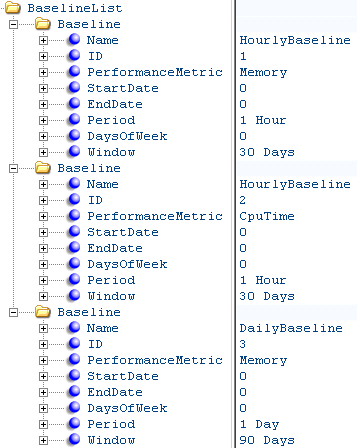
The following illustration provides an example of using BaselineList elements:
|
Copyright © 2015 CA Technologies.
All rights reserved.
|
|