

|
|
|
The Stacked Protocol Trend views in CA Performance Center show the top protocols that are used the most heavily for traffic on the selected interface. The views also show when the traffic occurred.
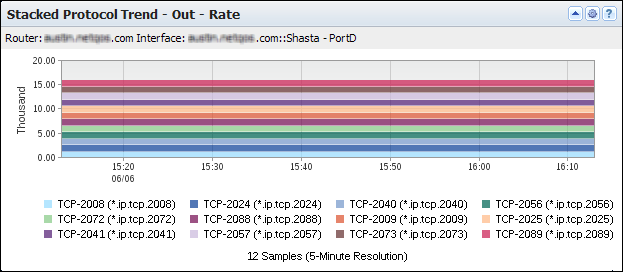
The view shows a timeline of the data rate, interface capacity utilization, or data volume for the top protocols in use during the reporting period--up to a maximum of ten protocols. The view includes the following information:
Consists of the router name, interface name, and interface description (under the view title).
Show the data rate, data volume, or interface capacity utilization for each Top N Protocol that is associated with traffic on the interface.
Point in time during data transmission--expressed in hours and minutes (X-Axis).
Data volume at each point in time--for example, expressed in thousands of flows in a Rate view or kilobytes in a Bytes view (Y-Axis). Depending on the data direction, the data volume is inbound to the interface, outbound from the interface, or both inbound and outbound. Rate is calculated by dividing the number of flows by the elapsed transmission time.
Percentage of the total interface capacity that the protocol uses (Y-Axis). The utilization percentage is calculated by dividing the data rate by the data speed, as measured on inbound traffic, outbound traffic, or all traffic.
Identifies the protocol for each color band by protocol keyword and tcp/udp port (bottom of the view).
By default, views and reports show the most recent 24 hours of data.
To see the Stacked Protocol Trend views in CA Performance Center, go to one of the following locations:
Available Actions for This View
You can perform several actions in this view, including the ones in the following list:
Find Protocol Trend Data in NFA Console Views and Reports
You can display protocol volume in the NFA console in trend charts or stacked trend charts for any interface you have selected:
Views: Stacked Protocol Trend (In and Out) for the Top N Protocols, plus other overview views.
Views: Stacked Trend for the Top N Protocols (In, Out, and Total).
Views: Trend (In, Out, and Total) for each of the Top N Protocols.
Views: (Depending on the selected report subtype): trends, stacked trends, trend summaries, and multi-trend summaries for protocols, protocol hosts, and protocols in conversations.
To display Flow Forensics-level detail, click the Flow Forensics link and run a Flow Forensics report.
| Copyright © 2012 CA. All rights reserved. |
|