This section contains the following topics:
RMFRPT - z/OS Report Class Analysis by SYSPLEX, CPCID, and SYSID
RMFS10 - z/OS Daily Top 10 Service Classes by SYSPLEX
RMFSRV - z/OS Service Class Analysis by SYSPLEX, CPCID, and SYSID
The RMFRPT query displays resource usage and performance indicators for z/OS Report Classes. As delivered, each chart shows the general processor CP, zIIP, and zAAP CPU time used by a Report Class or Report Class Period. The CPU times used for each processor engine type are stacked and are scaled using the left Y-axis. Two lines are plotted against the right Y-axis scale—the performance index (PI) for the Report Class Period, and a performance index "goal met" reference line, set to 1. As delivered, the RPTCLS query shows activity for the past three days activity. The X-axis displays DATE concatenated with HOUR. For each SYSPLEX, the Report Class Periods are presented in Relative Importance order, with the most important Report Classes presented first.
The chart heading information shows the Report Class Name, Relative Importance, Goal Type, and Report Class period charted. Three different data extract views are provided:
To prevent scaling issues, performance index values greater than 5 are set to 5. Performance index values between zero (0) and one (1) mean that the Report Class exceeded the specified performance goal. A value equal to 1 means that the goal was met exactly. Values greater than 1 means that the specified performance goal was not met. The performance index cannot be computed for certain goal types such as DISCRETIONARY and SYSTEM SPECIFIED.
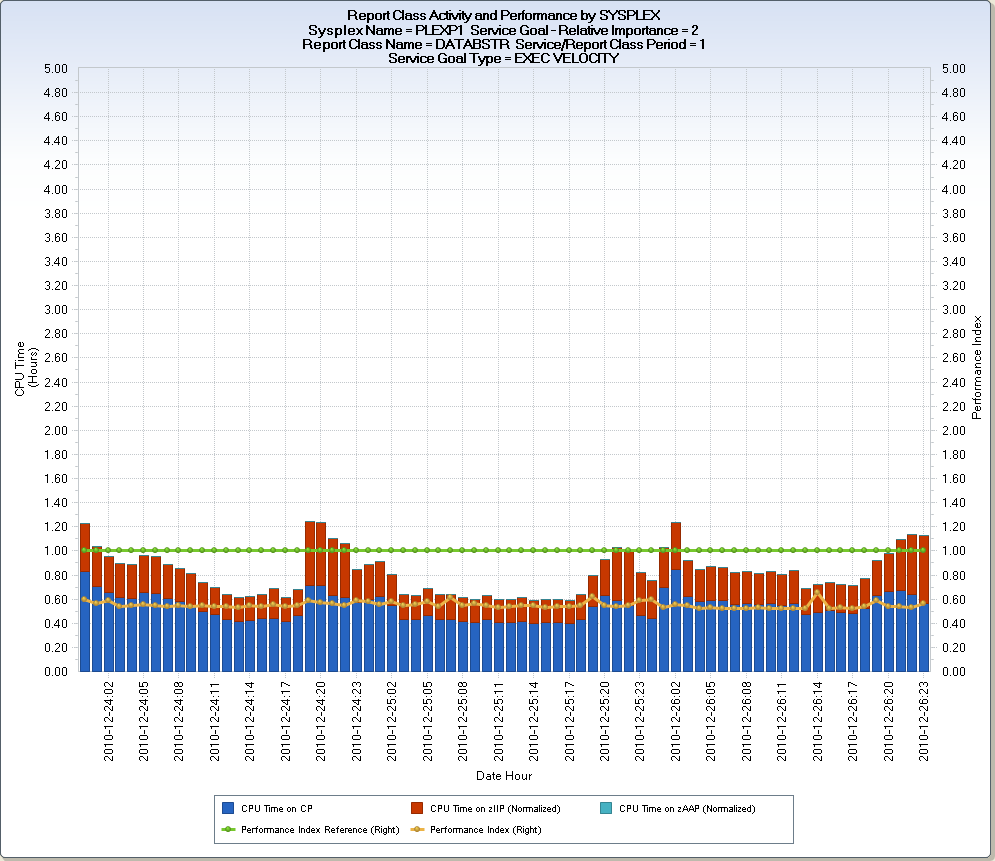
The first chart shows an example of a homogeneous Report Class. A homogeneous Report Class is created by selecting workloads from a specific Service Class. The Report Class displayed, DATABSTR, consistently exceeding its Execution Velocity goal as shown by the Performance Index value (orange line) consistently below 1. Workloads in this Report class use both CP and zIIP processor engines.
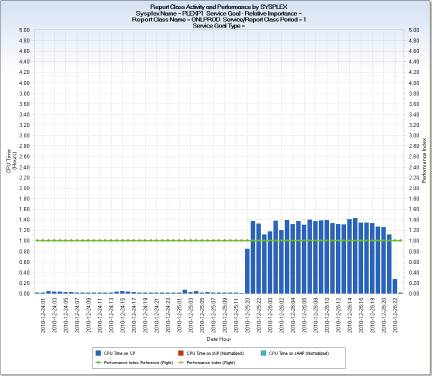
The second chart shows an example of a heterogeneous Report Class. A heterogeneous Report Class is created by selecting workloads that execute in two or more Service Classes. The Report Class displayed, ONLPROD, uses general-purpose CP engines exclusively. Because the workloads selected for Report Class ONLPROD spanned two or more Service Classes, Level of Importance, Service Class Period level information, Goal Type and PI cannot be displayed.
All workloads running on z/OS are assigned to a Service Class. Report Classes are optional, user-defined reporting groups. When the workloads assigned to a Report Class are homogeneous (for example, a Report Class that selects a single CICS region), the Report Class data includes Importance Level, Period level records, Goal and Performance Index information. When a Report Class is heterogeneous, meaning that the workloads reported on span Service Classes, the Report Class Period is reported as one (1) and there is no information for the Importance Level, Goal Type, and Performance Index. For heterogeneous Report Classes, focus on resource utilization (for example, CPU time, I/O, paging, and so on) reporting.
All three Q&R output views generated by the RMFRPT query are organized by SYSPLEX. Charts are produced for each Report Class (heterogeneous) or Report Class Period (homogeneous). Each chart shows the Report Class CPU utilization. Other information is provided when the Report Class is homogeneous.
In general, Report Classes are defined to support reporting on specific workloads or groups of workloads. The number of Service Classes defined for a specific WLM Policy is limited. Up to 999 Report Classes can be defined to allow tracking of specific workloads within a Service Class, or groups of workloads that span Service Classes. CPU time is the default resource usage metric plotted, but each Data Extract CSV provides a number of other performance metrics that can be alternatively selected for charting. These metrics include DASD Report time, paging rates, and average storage used.
Note on data extracts—by design, SYSPLEXES can span Central Processing Complexes. If your SYSPLEXES do not span CPCs, then the first two data extracts are identical, with the exception that the second data extract, Report Class by SYSPLEX CPCID, identifies the CPC in each chart title. If your SYSPLEXES do span CPCs, then the Report Class by SYSPLEX CPCID data extract displays multiple charts for a Report Class that ran on multiple CPCs.
Report Class by SYSPLEX
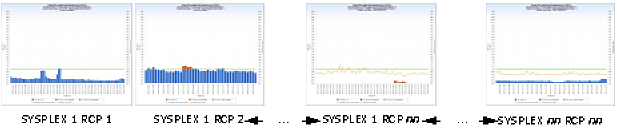
Note: RCP=Report Class Period
SECCPUTM – CPU Time on CP
SECSUPTM – CPU Time on zIIP (Normalized)
SECZAPTM – CPU Time on zAAP (Normalized)
SECPINDX – Performance Index
PINDXREF – Performance Index Reference (value set at 1)
HHMM – Hour : Minute
Data element HHMM is derived by concatenating the HOUR and MINUTE of each RMF interval together, separated by a colon, HH:MM (for example, 14:59 meaning hour 14, 59th minute).
Report Class by SYSPLEX CPCID
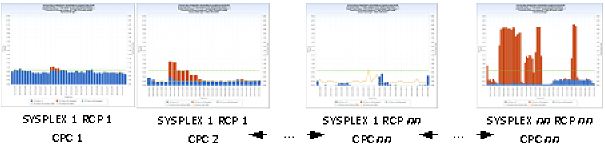
Note: RCP=Report Class Period
SECCPUTM – CPU Time on CP
SECSUPTM – CPU Time on zIIP (Normalized)
SECZAPTM – CPU Time on zAAP (Normalized)
SECPINDX – Performance Index
PINDXREF – Performance Index Reference (value set at 1)
HHMM – Hour : Minute
Data element HHMM is derived by concatenating the HOUR and MINUTE of each RMF interval together, separated by a colon, HH:MM (for example, 14:59 meaning hour 14, 59th minute).
Report Class by SYSPLEX CPCID and SYSID
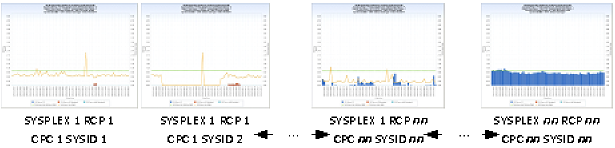
Note: RCP=Report Class Period
SECCPUTM – CPU Time on CP
SECSUPTM – CPU Time on zIIP (Normalized)
SECZAPTM – CPU Time on zAAP (Normalized)
SECPINDX – Performance Index
PINDXREF – Performance Index Reference (value set at 1)
HHMM – Hour : Minute
Data element HHMM is derived by concatenating the HOUR and MINUTE of each RMF interval together, separated by a colon, HH:MM (for example, 14:59 meaning hour 14, 59th minute).
TRIM(CPUMOD)||'-'||TRIM(CPCMODID)||'-Serial: '||SUBSTR(CPCSEQNB,12,5);
DATEPART(ENDTS);
PUT(HOUR(ENDTS),Z2.) || ':' || PUT(MINUTE(ENDTS),Z2.);
PUT(DATEPART(ENDTS),YYMMDDD10.) || ':' || PUT(HOUR,Z2.) ;
PUT(DATEPART(ENDTS),YYMMDDP10.) || '-' || HHMM ;
1 ;
The following modifications can be made to the RMFRPT query:
| Copyright © 2011 CA. All rights reserved. | Email CA Technologies about this topic |