

Connector Guides › Connectors Guide › Connecting to Endpoints › CA Arcot Connector › How to Connect CA Identity Manager to CA Arcot
How to Connect CA Identity Manager to CA Arcot
This scenario describes how to configure a CA Arcot endpoint and the JCS, and then connect the endpoint to CA Identity Manager.
The following diagram shows the steps:
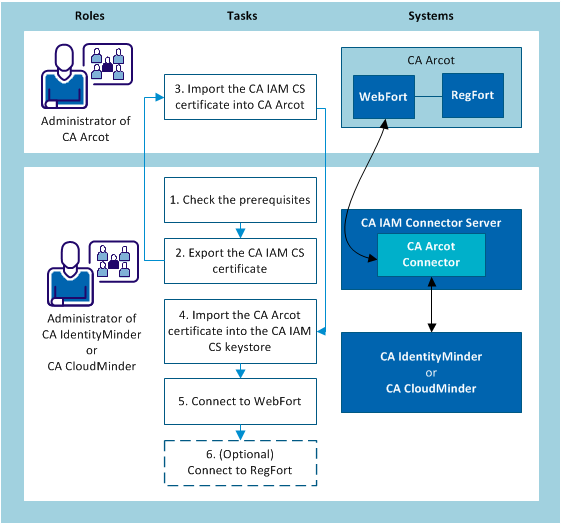
- The Arcot administrator does the following:
- Check the prerequisites for connecting to CA Arcot.
- Set up two-way SSL in CA Arcot.
- The CA Identity Manager administrator sets up SSL, with the following steps:
- Import the CA Arcot server certificate into the JCS keystore.
- Issue the client certificate for the JCS.
- Install the Certificate for the JCS.
- The CA Identity Manager administrator connects CA Identity Manager to WebFort.
- (Optional) The CA Identity Manager administrator connects CA Identity Manager to RegFort.
Prerequisites for Connecting to CA Arcot
This section is for the administrator of CA Arcot.
Before the connector server can be connected to CA Arcot WebFort, the administrator of CA Arcot verifies that the following prerequisites are met:
- The following servers are set up and running:
- User Data Store (UDS) web server
- WebFort server
- An Arcot organization has been created and its status is Active. The connector server cannot connect to organizations whose status is Initial, Inactive, or Deleted.
- The UDS and the WebFort server contain the organization that you want to connect to.
To connect to RegFort, verify that the RegFort server shares the UDS with WebFort.
Set Up Two-Way SSL in CA Arcot
This procedure is for the Arcot administrator.
To begin the process of securing communications between CA Arcot and the JCS, set up two-way SSL on the CA Arcot endpoint. For instructions, see "Appendix F: Configuring for SSL" in Arcot WebFort Installation and Deployment Guide. This is available for Windows and for UNIX.
After you have set up two-way SSL, the integrator can import the CA Arcot server certificate into the JCS.
Copyright © 2013 CA.
All rights reserved.
|
|