

When data is no longer valid for your implementation, delete the data from CA APM using the Data Importer. In most situations, however, it is considered good IT asset management practice to keep the data in the repository with a status of inactive. This method allows you to access the data for historical and audit purposes. However, in some cases, the data was created by mistake. In these cases, you want to delete the data.
Important! In this scenario, the system administrator performs the data deletion. However, the administrator can grant Data Importer User Access or Data Importer Admin Access to any CA APM user role. User access allows users to create imports, modify or delete their own imports, and view any import that was created by another user. Admin access allows users to create imports and modify or delete any import that was created by any user.
You can delete primary objects and can remove the relationships to their secondary objects. For example, you delete an asset (primary object) and you remove its relationship to a legal document (secondary object).
When you delete a primary object and its relationship to a secondary object, the secondary object is not deleted. The primary object is deleted, and the relationship between the primary and secondary object is removed. For example, if you delete an asset and its associated legal document relationship, the asset is deleted but the legal document is not deleted. Only the relationship between the asset and the legal document is removed.
The following diagram illustrates how a system administrator deletes data.
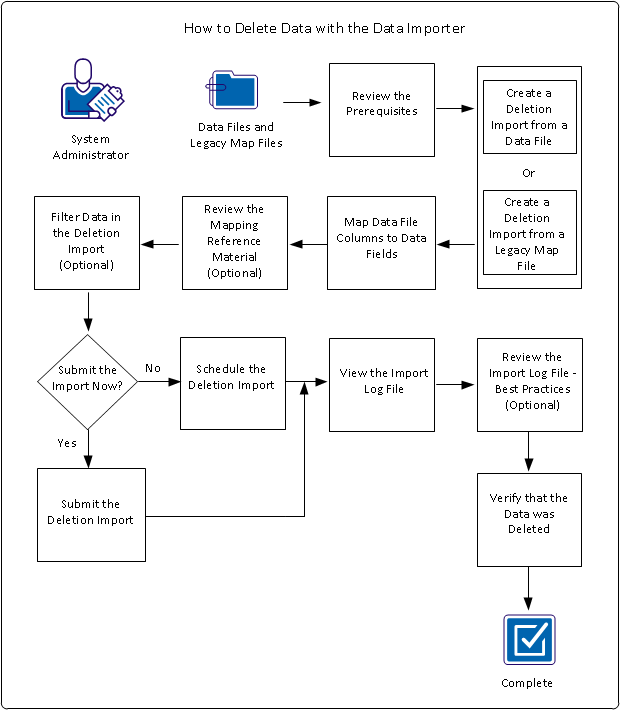
To delete CA APM data, perform these steps:
Example: Delete Laptops
Miriam, the CA APM system administrator at Document Management Company, wants to delete several laptops that have been retired and recycled. Miriam also wants to delete the associations with legal documents that were made for these laptops. Miriam has a data file that identifies the laptop names, the manufacturers, and the model names. Using the Data Importer and the source data file, Miriam creates a deletion import. After Miriam runs the import, she views the import statistics, import log file, and user interface to verify the deletions.
|
Copyright © 2013 CA.
All rights reserved.
|
|