

In the column mapping, the percent signs that appear before and after column names identify the names as column headers in your source data file. You can also specify a hard-coded value in the Source Field that you want to apply to all records in your source data file. You can then map the hard-coded value to a Destination Field. The hard-coded values do not display with percent signs to distinguish these values from the source data file column names.
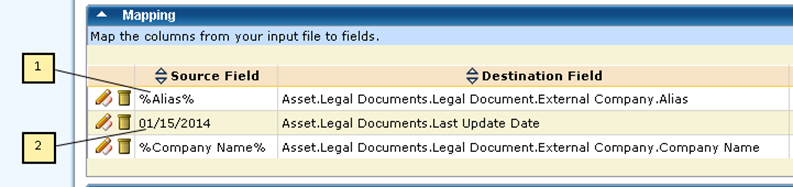
You can define a hard-coded value in the Source Field to expand your source data and to ensure that you include all required fields. Hard-coded values typically do not begin and end with a percent sign (%). If you have hard-coded values with percent signs, the values cannot match the field names in your source data file.
Example: Use hard-coded values for asset family
In this example, the assets in your source data file do not contain asset family, which is required when creating an asset. You can add a hard-coded value to your mapping. If all of your assets are hardware, you can enter Hardware in the Source Field. You can map this value to the Asset Family field. If your assets belong to different families, add a column to your source data file with the corresponding asset families before importing or deleting data.
The following information illustrates the difference between values from your source data file and values that are added through hard-coded values:
Note: You can also use the Main Destination Object to specify that all records in your source data file belong to a particular family or template. For example, the Asset (Hardware) selection for Main Destination Object specifies that all source records belong to the hardware asset family.
|
Copyright © 2013 CA.
All rights reserved.
|
|