

Database Conversion Phase › Step 3: Physical Database Preparation
Step 3: Physical Database Preparation
To prepare the physical database, perform these steps:
- Submit DDL statements that describe the physical database using the CA IDMS Command Facility (IDMSBCF); physical DDL statements include the SEGMENT, DBNAME TABLE, and DMCL statements; include a GENERATE clause to generate database name table and DMCL load modules
- Punch the database name table and DMCL load modules using the PUNCH utility statement
- Link the resulting object modules to a load library
- Identify the DMCL to the runtime system:
- Central version—specify the global DMCL name in the #DCPARM macro which defines system startup parameters; incorporate the Total DMCL statements into the global DMCL using the MODIFY DMCL statement
- Local mode—specify the DMCL name in the SYSIDMS parameter file
Note: For more information about the physical DDL statements and SYSIDMS, see the CA IDMS Common Facilities Guide. For more information about the CA IDMS Command Facility, see the CA IDMS Common Facilities Guide. For more information about #DCPARM, see the CA IDMS System Operations Guide.
IDMSBCF Execution
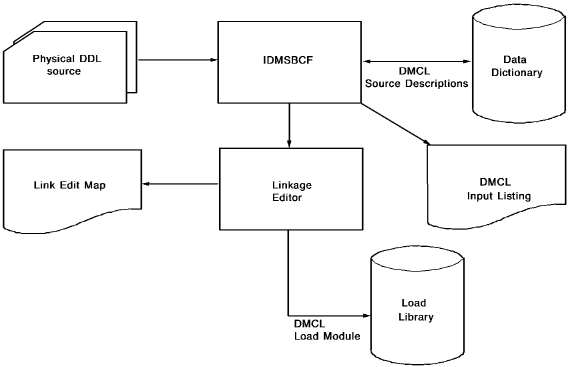
The following figure shows execution of IDMSBCF, the program you use to compile physical DDL.
Input to IDMSBCF
As input to IDMSBCF, you use the DDL statements that describe these physical components of the database:
- Segments
- Database name table (dbname table)
- DMCL
Output from IDMSBCF
Output from IDMSBCF is as follows:
- DMCL and database name table load modules
- A physical DDL input listing, including embedded warning and error messages issued by IDMSBCF (for a description of these messages, see the CA IDMS Messages and Codes Guide)
Copyright © 2013 CA.
All rights reserved.
|
|