

Creating Table Procedure Specifications › Define a Table Procedure Specification › Define the Basics
Define the Basics
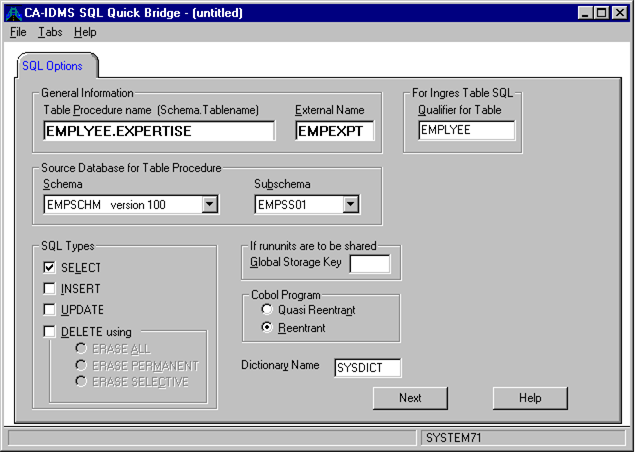
When you select New from the File menu, Quick Bridge displays the SQL Options tab in the application window. The SQL Options tab prompts you for basic information to define the table procedure specification, such as a name for the table procedure, the schema and subschema that define the records in the table procedure, and the SQL operations that can be performed on the table procedure.
To define basic information about the table procedure
- Verify that the dictionary you want to access is correct. The default dictionary is the dictionary specified in the ODBC datasource definition. Modify the dictionary by typing the name in the Dictionary Name edit box. This name actually is the name of an SQL schema that must have been defined for the non SQL schema SYSDIRL.IDMSNTWK of the dictionary of interest.
- Type a name for the table procedure using this format:
schema_name.table_name
where schema_name is the name of an SQL schema defined in the CA IDMS system catalog and table_name is a name that conforms to SQL table naming conventions.
- In the External Name edit box, type a 1- to-8-character external name under which the COBOL program will be linked. Quick Bridge also uses this value in the default naming conventions for files that it creates.
- In the Schema and Subschema drop-down list boxes, select the nonSQL database schema and subschema that supply the definitions of the data that you want to access.
- In the SQL Types group, optionally select what SQL operations you want the table procedure to be able to perform on the nonSQL database. SELECT is always an option. If you choose DELETE, you can also select one of the DELETE options, which are described in detail in online Help.
- If rununits are to be shared. If Global Storage Key is left blank, each generated table procedure will use its own CA IDMS rununit. Otherwise, this table procedure will share a rununit, with other table procedures that use the same Global Storage Key.
- COBOL Program — Specifies the type of reentrancy of the compiled COBOL program. Choose either Quasi Reentrant or Reentrant. This option drives the syntax in the generated SGN file.
- In the Qualifier for Table edit box, type the qualifier for the table definition that will be generated.
The following example displays the SQL options tab containing information for the sample table procedure EMPEXPT. The SQL operations selected for the table procedure mean that data in the table procedure can be retrieved, inserted, updated, and deleted.
Copyright © 2013 CA.
All rights reserved.
|
|