

As an application developer, you can begin defining application components as soon as the application structure diagram is complete. You can use CA ADS development tools to define a preliminary, or prototype version of the application early in the application development cycle. Application developers and users can execute the prototype to test and suggest improvements to the application.
As soon as the prototype application is approved, definitions that make up the application can be enhanced to perform all processing required by the final production application. In this part of the manual, "Developing the Prototype," you will develop a prototype Department application. Then you will take this prototype application and develop it into a fully functional application.
The first step in defining a prototype application in the data dictionary is to define the application's structure, based on the structure diagram, by using the CA ADS application compiler (ADSA). The structure of an application specifies how a user moves from function to function when executing the application.
In this chapter, you will begin defining the sample Department application introduced in Chapter 7, "Overview of CA ADS Application Development". This chapter includes:
Functions
An application is made up of the various functions necessary to do the work of the application. Each function represents a unit of work in the application. For example, different functions in the Department application:
Responses
The development team must arrange application functions so that users can easily get from one function to another. The team defines paths that a user can take between functions. Each path is called a response. At runtime, the user can select from among available responses to get from one function to another.
Application structure
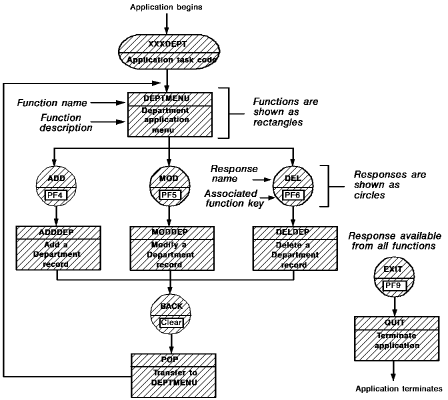
The arrangement of functions and responses constitutes the structure of a CA ADS application. The diagram below shows the structure of the sample Department application. This diagram includes both functions and responses because you need to define both types of application components. The structure diagram for an application serves as a blueprint for application development. Functions and responses in this sample application will allow users to add, modify, and delete information about departments.
Note: In this sample application, you can substitute your initials for the XXX in the task code, application name, dialog names, etc.
Types of functions
Most functions in a CA ADS application, including the Department application, are menu, dialog, or system functions.
Menu function
A menu function displays a menu screen to an end user.
For example, the DEPTMENU function in the Department application is a menu function. The menu screen displayed by DEPTMENU lists the ADD, MOD, DEL, and EXIT responses. At runtime, the user can select any of these responses from the DEPTMENU menu screen. To define a menu function, all you have to do is specify where the menu belongs in the application structure. CA ADS provides predefined screen formats and processing logic for menu functions.
Dialog function
A dialog function typically displays a screen that supplies information to or requests information from a user. Based on entries made by the user, the function performs processing activities such as data retrieval and update. As a developer, you define CA ADS programs, called dialogs, to handle runtime operations for dialog functions.
In the sample Department application, functions ADDDEP, MODDEP, and DELDEP are dialog functions. The user can use ADDDEP to add a new department record, MODDEP to modify an existing department record, and DELDEP to delete a department record from the database.
System function
A system function displays a screen and/or performs operations that are common to most applications.
For example, the POP system function in the sample Department application returns the user to the most recently used menu screen (in this case, the DEPTMENU menu). The QUIT system function allows the user to exit from the application at any point. To define a system function, all you have to do is specify where the function belongs in the application structure. CA ADS provides all necessary logic and screens for system functions.
Paths between functions
Responses define paths between functions. At runtime, a user moves from one function to another by selecting a response that leads from the first function to the next. For example, a user of the Department application can get from DEPTMENU to ADDDEP by entering a nonblank in the selection field to the left of the ADD response on the menu.
The user selects a response either by typing its name (for example, ADD) in a special response field on the screen or by pressing the function key (for example, [PF4]) associated with the response. Default responses can be defined for functions, making it easier for users to get to frequently used functions. The structure diagram shown above gives the name and function key for each response in the sample Department application.
Worksheets
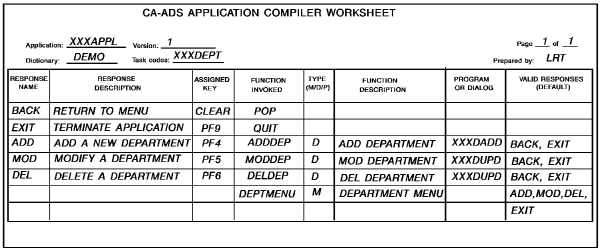
A typical application has numerous responses and functions. Some responses and functions may be available in several places in the application. To help keep track of the responses and functions in an application structure, some sites develop a worksheet of responses and functions for the application. A standard worksheet that documents each response and function is especially useful when you are defining the application structure in the data dictionary. Filling out a worksheet for application responses and functions can simplify the application development process and can also provide documentation of application development decisions.
A sample worksheet for the Department application is shown below.
Task codes
To enable users to access an application, you define entry points into the application structure. You establish entry points for CA ADS applications by defining task codes. When you define a task code, you associate it with a specific application function. At runtime, you use the task code to begin executing the application at the associated function. Both application developers and users invoke applications by using task codes.
For example, the XXXDEPT task code is associated with the DEPTMENU function in the sample Department application shown previously. A user can invoke the application from a CA IDMS/DC or DC/UCF system by specifying XXXDEPT and pressing [Enter]. The DEPTMENU menu screen is the first application screen shown to the user.
Multiple task codes
You can define more than one task code for an application. Defining multiple task codes, or entry points, is particularly useful for very large applications. For example, if the sample Department application is incorporated into a large, company-wide application, users who only need to use department information can use the XXXDEPT task code to enter the application at the DEPTMENU function. Clerks in the Accounts Receivable office can use a different task code to enter the company-wide application at a menu that lists billing and customer functions.
Note: In the sample application, you can substitute your initials for the XXX in the task code.
This section contains the following topics:
|
Copyright © 2013 CA.
All rights reserved.
|
|