

How to Use SQL Web Connect › Connect via ODBC or JDBC › Connect via JDBC
Connect via JDBC
Configure JDBC and access your data using JCF (the Java Command Facility).
Follow these steps:
- Run the JCF reporting tool. JCF is automatically installed when CA IDMS Server is installed. To bring up JCF, go to Start, All Programs, CA, CA IDMS Server r17 and select JCF Demo App.
The IdmsJcf - CA IDMS Java Command Facility window is displayed.
- Select the Connect button on the top right of the window.
The IdmsJcf Connection Information dialog is displayed:
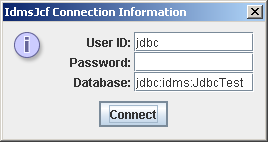
- Fill in the following fields of the dialog:
- Specify the User ID and Password. Use an account that is present on the CV you are connecting to.
- Specify the Database. Use a Type-4 JDBC connection URL format. The format for a JDBC Type-4 connection is:
jdbc:idms://ServerName:Port/DatabaseName
Replace ServerName, Port and DatabaseName with appropriate values.
- Click on Connect.
- Wait until the connection is established and then overtype the sample SELECT statement (‘select * from jdbctest’) in the SQL window and click on the Execute button on the right.
Note: For more information on using JCF, see the IdmsJcf section in the CA IDMS Server User Guide.
Copyright © 2014 CA.
All rights reserved.
|
|