

Clicking Back closes this window and displays the Operation Selection window.
Clicking Next brings up the Deployment Options panel
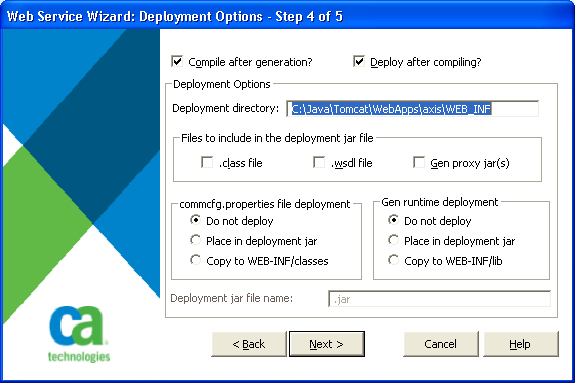
This panel allows you to define the values needed to deploy the web service to a local Apache-Axis installation. When the window is first displayed, the Compile after generation check box is not selected and all the other fields on the window are disabled. Selecting the Compile after generation check box informs the wizard that it should compile the web service after it has been generated. It also enables the Deploy after compiling check box.
Selecting the Deploy after compiling check box informs the wizard that it should copy the appropriate files to the deployment directory so that Axis will be able to run the web service. It also enables all the other fields except for the Deployment jar file name entry field, which will be enabled when one or more of the other options are selected that indicate that a jar file needs to be created.
The Deployment directory indicates the path where your Axis installation WEB-INF directory is located. The wizard assumes that there is a lib directory and a classes directory located under the WEB-INF directory. If those directories do not exist, they are created. Note that the specified deployment directory must include WEB-INF as part of the directory path.
The check boxes and radio buttons on this window allow you to determine what should be placed in the deployment jar file. If none of the check boxes are selected and both do not deploy radio buttons are selected, the deployment jar file is not created. In this case, the Deployment Jar file name field is disabled until a check box or one of the Place in deployment jar radio buttons is selected.
The check boxes and radio buttons on this window are as follows:
Indicates where to deploy the web service class file (which is created by the compile of the <service>.java file). If this box is checked, the class file is included in the deployment jar file. If it is not checked, the class file is copied to the WEB-INF\classes directory.
Indicates where to deploy the web service WSDL file. If this box is checked, the WSDL file is included in the deployment jar file. If it is not checked, the WSDL file is copied to the WEB-INF\classes directory. Copying this file to either location ensures that Axis is able to display the correct WSDL file when it is queried for this information.
Indicate where to deploy the jar files for the CA Gen Java proxies that are referenced by this web service. If this box is checked, the jar files are included in the deployment jar file. If it is not checked, the jar files are copied to the WEB-INF\lib directory.
Indicates whether the CA Gen commcfg.properties file should be copied into the deployment jar file, to the WEB-INF\classes directory, or should not be copied. The commcfg.properties file is copied from the directory indicated by the %GENxx% environment variable. Select the Do not deploy radio button, if on a previous deployment, you had selected the Copy to WEB-INF/classes radio button so that there is no need to copy the file again.
Note: xx refers to the current release of CA Gen. For the current release number, see the Release Notes.
Indicates whether the CA Gen Java runtime jar file should be copied into the deployment jar file, to the ..\WEB-INF\lib directory, or should not be copied. The file (named CAGenRuntime.jar) is created when the deployment step is executed. This builds a single jar file from the multiple jar files that make up the Java runtime. Select the Do not deploy radio button, if on a previous deployment, you had selected the Copy to WEB-INF/lib radio button so that there is no need to copy the file again.
The Deployment jar file name entry field lets you set or change the name of the Java jar file that may be used for the deployment.
Note: If a deployment jar file is created, it will be copied to the ..\WEB-INF\lib directory as part of the deployment.
|
Copyright © 2013 CA Technologies.
All rights reserved.
|
|