

On the Operation Selection window, clicking Back closes the window and displays the previous window. Clicking Next (or double-clicking in the Selected Operations list) displays the App Server Information panel:
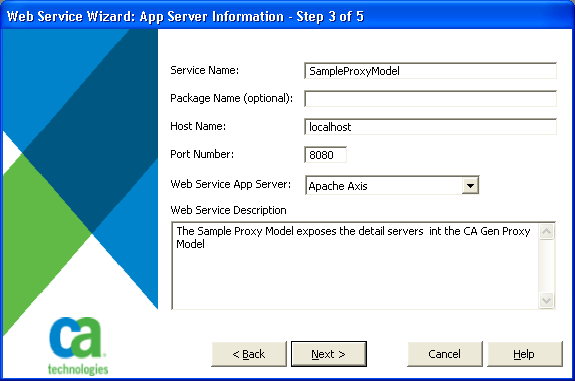
This window allows you to enter a name for your web service. The name may have spaces, but all spaces are removed and the first character of each word in the name is capitalized. For example, if you named your web service My first web service, the actual name of the service becomes MyFirstWebService. The web service name is used for the files generated by the wizard, the directory where the files are placed, and in the URL used to locate the service.
A Java package name may be specified. If one is entered, that name is used for the package statement in the generated Java source code. Also, every word separated by periods in the name is used to create directories where the generated code is placed. For example, a package name of com.ca.wizard results in the directory structure com\ca\wizard being created and the compiled Java class being placed in this directory.
The host name and port number are used when generating the URL for the address location in the WSDL file. The generated URL is:
http://<host name>:<port number>/axis/services/< service name>
The Web Service Application Server field indicates which web service application server is the target for this web service (do not confuse a web service application server with application servers such as Tomcat or WebSphere). Currently, the only supported web service application server is Apache-Axis, an open source SOAP engine available as a free download from the www.apache.org web site. Axis is also included with a number of application servers including IBM's Web Services Toolkit, Macromedia's JRUN and ColdFusion MX, Apple's WebObjects, JBoss, and Borland's Enterprise Server.The Web Service Description field is an optional entry that is used to populate the documentation area of the WSDL file.
|
Copyright © 2013 CA Technologies.
All rights reserved.
|
|