

BLOB › Construction and Test › Configure the Build Tool to Support External Action Block Linking
Configure the Build Tool to Support External Action Block Linking
Earlier, in the section titled Software Required to Complete this Appendix, you were instructed to copy the extrn directory to your models directory. The extrn directory contains the externally coded action blocks. The Build Tool Profile needs to be updated to know where to find the EAB library.
Follow these steps:
- If it is not already opened, open the Build Tool.
- From the Build Tool Menu Bar, click Tools, Profile Manager. The Profile Manager will be opened.
- In the Profile Manager Profile Tree, select the C node within the tree.
- In the Profile Table, update the value of the LOC.EXTERNAL_LIB key to point to the library containing the externally generated code. In our example that was C:\Models\extrn\extrnc.lib as follows:
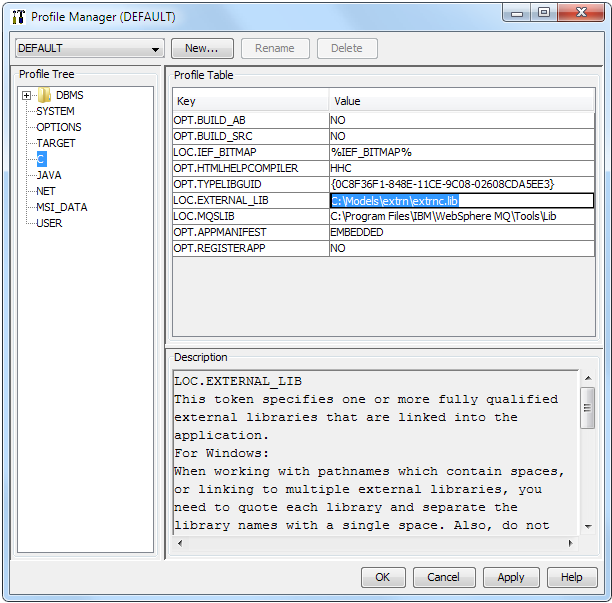
- Click OK to save the changes and close the dialog.
Note: The Tutorial eGolf model also makes use of a “black box” component. If you have not done so already, you will need to follow the instructions in Chapter Five of the Tutorial for Configuring the Build Tool to Support Component Linking.
Copyright © 2013 CA.
All rights reserved.
|
|