

BLOB › Construction and Test › Load Module Packaging
Load Module Packaging
Before we can generate our source code and executables, we need to define how we want it all packaged.
Follow these steps:
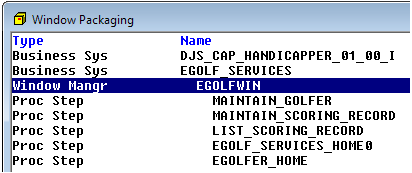
- Open Window Packaging. In the Window Packaging dialog, select (highlight) the window manager EGOLFWIN and expand it one level. It will look as follows:
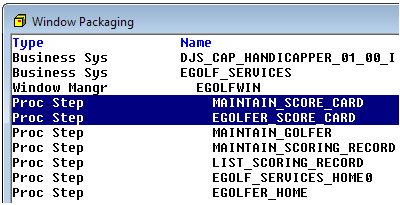
- From the Menu Bar, click Edit, Add Procedure Step. The Unpackaged Procedure Steps dialog will open. Select both procedure steps and click OK. The two procedure steps will be added to the EGOLFWIN load module as follows:
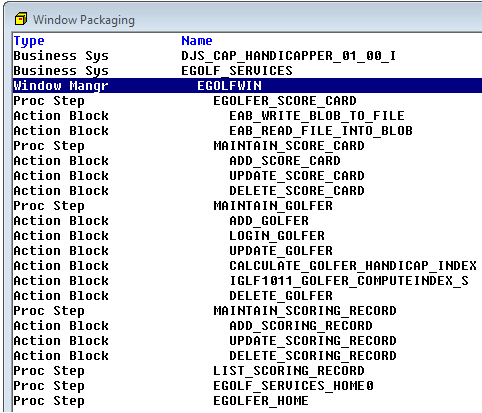
- In the Window Packaging dialog, select the EGOLFWIN load module once again. From the Menu Bar click Edit, Complete. The window manager will be expanded automatically as follows:
- The last things we need to do are to make sure the two External Action Blocks have the correct source code names. These names will be used by the Build Tool to link in the appropriate external. Double-click the action block EAB_WRITE_BLOB_TO_FILE and verify it has WRBLOB for the source name. Update it if necessary as follows:
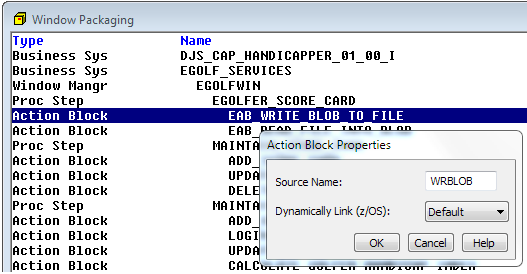
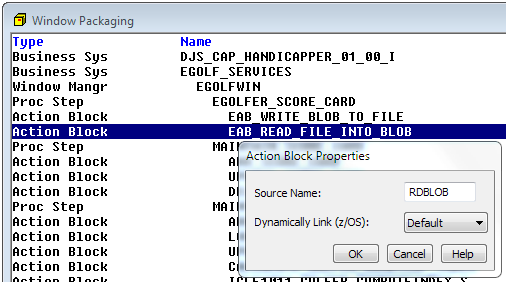
- Double-click the action block EAB_READ_FILE_INTO_BLOB and verify it has RDBLOB for the source name. Update it if necessary as follows:
Copyright © 2013 CA.
All rights reserved.
|
|