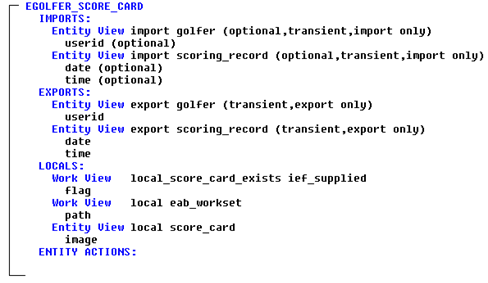
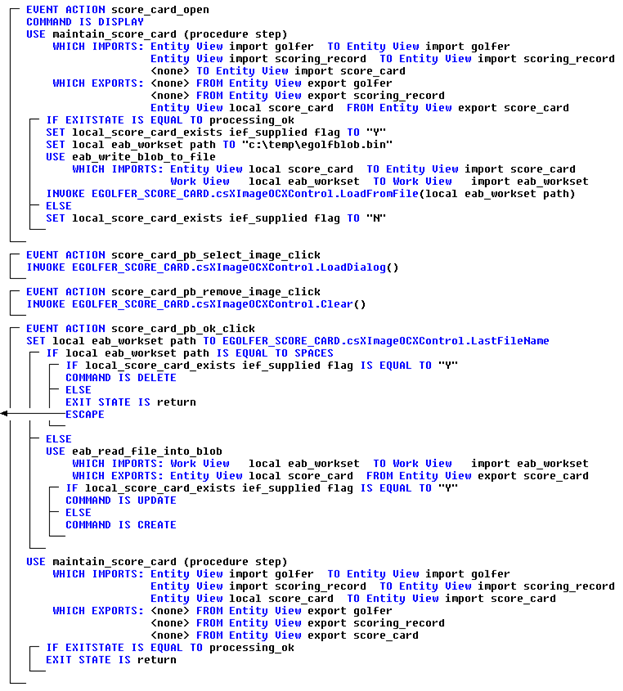
- The final event (in this diagram) is the OK push button click event. This event is a bit more complicated in that when the OK push button is clicked, they may be trying to add an image when none existed, update an image that did exist, or remove an image that they no longer want to keep. All from one button press. To help us figure this out, we need to know whether the Open event was successful in retrieving a score card image in the first place. If it was, we are either updating or deleting an existing image. If it was not, we are creating an image. So back in the Open event, we need to set a flag indicating whether or not it was successful. But first we need to define the flag.
Add a LOCALS work set view of the IEF_SUPPLIED flag. Name the view “local score card exists” and clear the selection of the Initialize on every entry checkbox as follows:
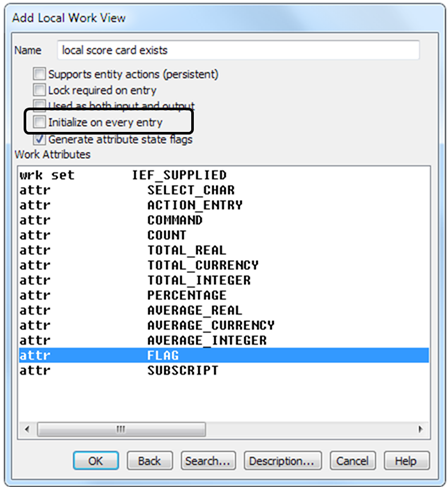
- It is important to clear the selection of the Initialize on every entry checkbox because normally local views are initialized (set to spaces in this case) on every execution of the procedure step. But we do not want that to happen. When we set this flag to some value, we want it to remain set until we close this dialog. Click OK.
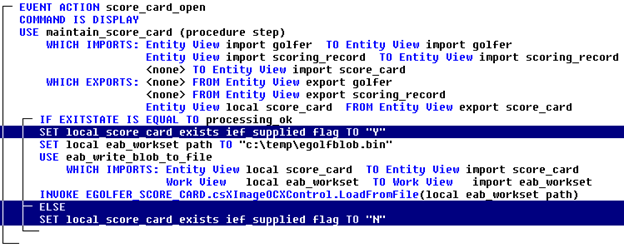
- So back in the Open event, for the first statement inside the IF EXITSTATE IS EQUAL TO processing_ok statement, we want to set this flag to Y. Select the IF statement and add a SET statement, setting the attribute view local_score_card_exists ief_supplied flag to a character string of Y.
- If it was not successful, we want to set it to N. So still in the Open event, select the last statement in the IF block of statements, the INVOKE statement, and add an ELSE statement after it.
- With the ELSE statement highlighted, add another SET statement, setting the attribute view local_score_card_exists ief_supplied flag to a character string of N. Now the completed Open event will look as follows:
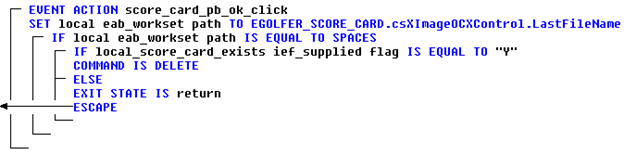
- So now we are back to the OK event. The first thing we want to know is if the last thing they did before clicking OK was to select an image, or clear an image. We can determine that by calling a method on this OCX Control that will return to us the path to the last file loaded. If in fact the last thing done was to clear an image, then the path will be spaces. So we want to set our local eab_workset path to the OCX Control LastFileName method.
Select the EVENT ACTION score_card_pb_ok_click. Add a SET statement selecting attribute view, local eab_workset path, TO expression, Window Object, EGOLFER_SCORE_CARD.csXImageOCXControl (OLEControl), in the OLE Object Browser the method LastFileName. Click the OK button, and then the Add Statement Add button. The OK click event will look as follows:

- So now if the path is equal to spaces then the last thing they did was to clear the image. If they cleared the image and then clicked OK, the implication is that they want to delete whatever they had before. If they did not have anything before then there is nothing to delete and then the implication is that they simply want to flow back to the EGOLFER_HOME page.
So we will check to see if the local eab_workset path is equal to spaces. If it is, we will check to see if a score_card exists. If it does, we will set the COMMAND to DELETE, in anticipation of calling the maintain_score_card server. Else we assume they simply want to return, so we will set the exit state value which will initiate the return flow, and escape completely out of the client procedure step.
Add the statements required to support the logic described above. When finished, the OK click event will look as follows:
Note: Make sure the arrowhead on the ESCAPE clears the vertical line associated with the EVENT ACTION. If it does not, double-click the ESCAPE statement and try positioning the hand pointer further to the left.
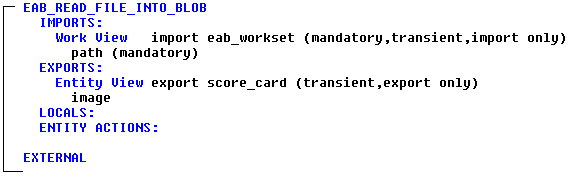
- The other option is that the path is not equal to spaces, which means the last thing done prior to clicking the OK button was to view something. So the implication is that they either want to create a new score_card if none existed, or update the score_card if it did. In either case we need to read the file into a BLOB view so that we can update the database. This will require another External Action Block. This EAB will import the eab_workset path, and export the score_card image.
Create an external action block and name it eab_read_file_into_blob. Add an IMPORTS work view of the eab_workset path and name it Import, and add an EXPORTS entity view of the score_card image and name it Export. Refer to the prior instructions for adding an EAB if you need assistance. The completed EAB will look as follows:
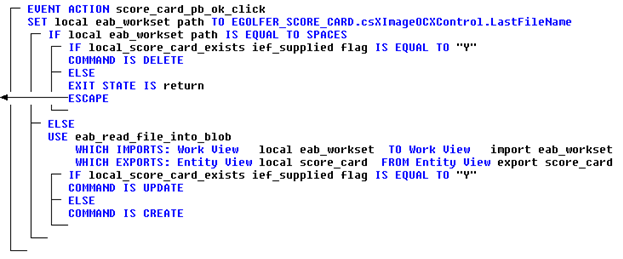
- Close the new External Action Block and if necessary re-open the EGOLFER_SCORE_CARD procedure step action diagram. Back in the OK click event, we called the OCX Control method to return the last file opened. If the local eab_workset path is not equal to spaces, we want to use the new EAB to read that file into the local score_card image. Then if a score_card already exists in our database, we can set the COMMAND to UPDATE in anticipation of calling the maintain_score_card server procedure step. If a score_card does not exist, we can set the COMMAND to CREATE.
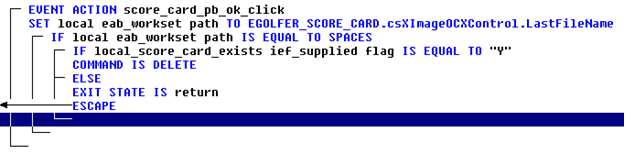
In the Open event, select the line directly below the ESCAPE statement as follows:
Add the ELSE statement followed by the USE eab_read_file_into_blob, matching both the import and export views to the equivalent local views, and then add the IF statement for setting the appropriate COMMAND. When finished, the OK click event will look as follows:
- Now that we have the necessary information, the only thing left is to call the maintain_score_card server and pass that information to it. And if the server completes its processing successfully, we can set the exit state value to return to the EGOLFER_HOME page.
Select the line that represents the end of the first IF statement as follows:
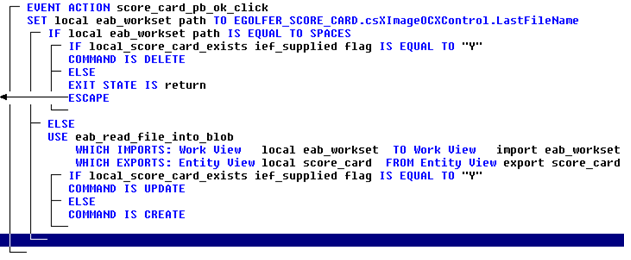
- Add a procedure step use statement calling the maintain_score_card server procedure step.
Match the import golfer and import scoring_record to the import views of the EGOLFER_SCORE_CARD procedure step and the import score_card to the local score_card.
You can ignore the export views and just select the Close button on the Match Exports dialog.
- If the processing was successful, set the EXIT STATE to the value that will be required to return to the EGOLFER_HOME page. The completed OK click event will look as follows:
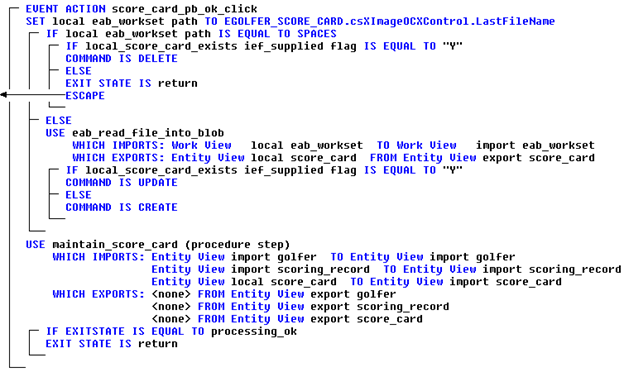
- If you have not done so lately, save the model. The completed EGOLFER_SCORE_CARD procedure step action diagram will look as follows: