

An External Action Block (EAB) defines the interface between a procedure step or action block that invokes it and the logic created outside of CA Gen (that is, handwritten subroutines). It provides the structure that is used to match the views of a procedure step with the views (input and output arguments) of the handwritten subroutine. This may be necessary when establishing communications between the following entities:
EABs are used on the target system and not on the development platform; EAB stubs are defined on the development platform.
The relationship of building EABs to the other required and optional IT tasks is described in the following illustration:
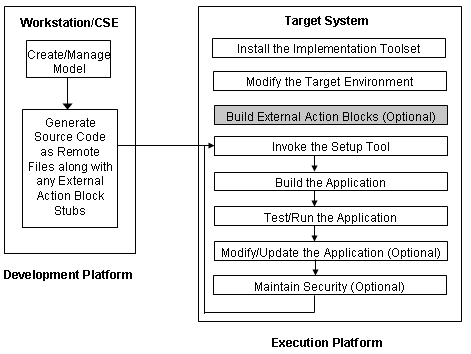
The single action statement EXTERNAL, which appears in the action block itself, distinguishes EABs from action blocks that are generated by the current model.
EABs are created when code is generated. The CA Gen software cannot generate actual code for EABs, but the software creates a stub during code generation. This stub specifies the information that your external subroutine provides to the CA Gen application through the EAB and the information that your external subroutine expects to receive. When an EAB is generated, the CA Gen software creates:
To make the action block usable, add a call to an existing subroutine or the logic necessary for the action block to perform its function.
For an application to properly execute on a target system, copy the EAB file to the target system where the appropriate logic must be added to the generated action block stub before it is compiled and installed. You must perform the following steps before you build and implement the load module containing the EAB:
EABs must be completed and installed on your target system before the load modules that invoke them are built.
Note: Completing EABs requires a significant amount of programming experience as well as knowledge of the programs or the information being accessed using the EAB.
Each of the following tasks is performed outside the CA Gen software. Before you build a load module that uses an EAB, complete the following procedures:
The Install Control Module (ICM) associated with each load module contains an EAB identification section. The section begins with the Generalized Markup Language (GML) tag :extern and ends with :eextern. Between the beginning and ending tags are the names of all EABs referenced by the load module.
There is an EAB identification section for each EAB referenced by the load module. All EABs in the load module are identified in the same section of the ICM.
If the ICM for a load module you are working with contains :extern and :eextern tag pairs, you have EABs that need to be completed before building this load module.
The following example identifies two EABs from an ICM:
:extern
member=EXTERN1
name=XTRN_SAM1
techsys=BUS_SYSTEM
:eextern.
:extern
member=EXTERN2
name=XTRN_SAM2
techsys=BUS_SYSTEM
:eextern.
During the load module packaging portion of construction, EABs are included in load modules in the same way other procedure steps and action blocks are included. When generation occurs for that load module, information identifying the action block is included in the generated ICM. However, the action block stub is not included in the resulting remote file. It must be moved to your target system as a separate file.
On the development platform, the EAB code must be moved from the source code component subdirectory (\c) associated with the model being implemented to the target system. The file containing EAB code is named using the action block name and a file extension appropriate to the language being used (.C).
CA Gen uses the views defined in the EAB to generate the stub for the interface routine. From the views in the EAB, determine:
The import and export views shown in the stub are supplied by the procedure step or action block that invokes the EAB. The import views define the data that is passed from the generated application to the interface routine. The export views define the data returned to the generated application from the interface routine.
Import and Export views in External Action Blocks may contain any of the supported attributes by CA Gen. This section is intended to give you a better understanding for handling views that contain attributes of type decimal precision.
The C language data structure for an attribute that is implemented with decimal precision is a DPrec array whose size is the length of the attribute plus 3 (for the sign, decimal point, and null terminator). A DPrec is a typedef of char.
Example:
An attribute that is defined as a number of 18 digits will be implemented as DPrec[21].
The number represented in the DPrec array may consist of the following characters depending on the definition of the attribute it implements:
For the import view, a decimal precision attribute may be its simplest form or may contain a plus sign with leading and trailing zeros.
For the export view, all decimal precision attributes must adhere to the following rules:
You can create logic for an EAB in the following ways:
When you use the generated stub, much of the work is already done in a format that is acceptable to the CA Gen software.
You can write EAB code in any language. Specific requirements exist, however, for the action block name and the order of parameters passed to and from the generated load module.
The generated load module passes the following parameters to the EAB interface routine. The parameters are passed in the following order:
For C with High Performance View Passing
For C Without High Performance View Passing
Identifies the first two parameters passed from the generated load modules. These parameters must be coded on the entry statement of the interface routine and must always be passed in this order to any subordinate routines that are called.
Identifies the position of the import and export views for C language depending on whether High Performance View Passing is used.
Note: High Performance View Passing impacts the order of parameters transferred into an EAB. By default, High Performance View Passing is set on.
For more information about High Performance View Passing, see the Host Encyclopedia Construction User Guide or the Toolset Online Help.
Identifies an array set to zeroes (null array). For target system implementation, this array is passed but not used (the array is used for IMS and CICS applications on the mainframe).
Note: For more information about the use of the PSMGR-EAB-DATA array, see the Host Encyclopedia Construction User Guide.
Note: For component development, High Performance View Passing must be set on for both the component and the consuming model.
The interface routine must contain data structures that correspond exactly to the import and export views of the EAB. The fields in the data structures correspond to attributes in the import and export views of the EAB.
Note: Each attribute field in the data structures must be preceded by a one-byte field defined in C as char. This one-byte field contains a value that must not be changed.
Modify the stub using any editor that can save files in the appropriate character set format. The modified stub cannot contain any control codes or header information unique to the editor.
After completing the EAB, you must:
Note: For more information about the Location Details screen, see the Setup Tool Help.
Note: For more information about the LOC.EXTERNAL_LIB token, see the Build Tool User Guide.
Note: For instructions on how to compile and link your EAB on your particular target system, contact your development organization.
After you complete all the required activities, you are ready to build load modules that use the EAB.
After a load module that uses the EAB builds successfully, you are ready to test the load module.
|
Copyright © 2015 CA Technologies.
All rights reserved.
|
|