

Target system implementation is a process for developing an application on one platform and executing it on another platform. Using this process, you can prepare a single CA Gen model for use on many different platforms. The following illustration describes this concept:
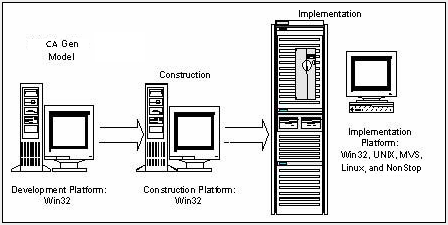
Applications are developed as models using various CA Gen Toolsets on a workstation called the Development Platform. Models are prepared for execution through a process called construction, which may occur on the development platform or on another system. The resulting components, called remote files, are transferred to a target system for compilation and execution. The remote files contain source code, data definition language (DDL), and special control information that allow the model to be installed as an application within a CA Gen environment on the target system.
The various components of the remote files define the organization and contents of the application, and make it possible for CA Gen to identify and process the application on the target system. You can then test and run the application on the target system within the CA Gen environment. In the case of NonStop, each application is comprised of at least three remote files—one for the database information, one for the referential integrity triggers, and at least one load module.
To modify an application, update the original model on the development platform, regenerate the changed elements into remote files, and move the files to the target system. In this way, you can enhance and modify the implemented systems without having to work directly with the generated code.
The following illustration shows basic workflow involved when implementing an application on a target system. The workstation tasks are performed first, then the remote files are transferred and, finally, the target system tasks are completed. The target system tasks primarily involve the Implementation Toolset and the Setup Tool, which must be installed before the remote files can be processed.
Note: For more information about installing the Implementation Toolset and the Setup Tool, see Distributed Systems Installation Guide.
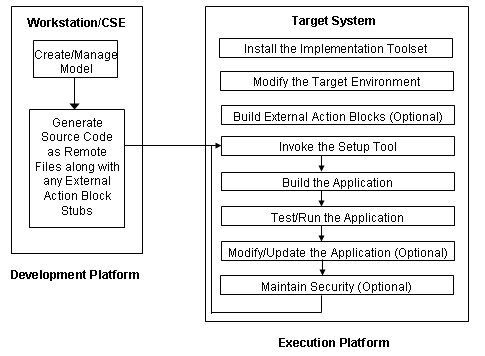
Note: This illustration is referenced several times throughout the guide to illustrate the relationship between tasks required to use the IT on the target system.
You must package a CA Gen model before generating the remote files that are transferred to your target system and installed. Application models are packaged into one or more load modules. If a model is packaged into more than one load module, each load module is implemented as a separate remote file and linked to the target system into a separate executable. Component Models are packaged into one or more operations libraries.
Note: For more information about packaging, see the Workstation Construction User Guide.
After a completed model goes through construction, it is stored as a compilation of source code, data definition language (DDL), and other components in special files called remote files, also known as implementation packages (IPs). The file extension of a remote file is .rmt. Sections in the remote files define the organization and contents of the CA Gen generated application, which makes it possible for CA Gen to identify and process all the relevant components of the application on the platform where the application will execute.
After construction is complete, the remote files are moved (outside of CA Gen) to the target system where they can be stored, interpreted, compiled, tested, and executed.
Note: Do not edit the remote file with a PC text editor before transferring them to NonStop. Some editors embed extra characters within the text. NonStop's compilers may reject the generated code.
The following types of remote files are required for an application:
Note: Operation Libraries are not supported on NonStop.
These remote file types are summarized in the following table and explained in more detail in the following sections:
|
Type |
Number Used |
Description of Contents |
|---|---|---|
|
Load Module |
One or more per application |
Application source code for a single load module. |
|
Database |
Usually one per application |
DDL for an application database. For target system implementation, all load modules for a CA Gen application usually share a common database. |
|
Referential Integrity |
One per application |
RI trigger routines for an application. These routines implement referential integrity for the entire application. |
Every remote file has an Install Control Module (ICM), or install deck, which identifies and provides instructions for installing all components of the remote file. The ICM is in Generalized Markup Language (GML) format.
The ICM identifies each component of a load module, database, or RI trigger set, so that it can be properly installed on your target system. The contents of the ICM depend on the packaging selected. The ICM carries information for the complete load module, database, or RI trigger set, even if code is generated only for one portion of the specified remote.
The load module remote file includes generated code in a high-level language. This code contains a Dialog Manager, one or more procedure steps, screens, and the action blocks used by the procedure steps. The Dialog Manager is created by CA Gen, based on the control flow of the procedure steps and action blocks you have packaged into this load module. You specify the procedure steps and action blocks contained in each load module during packaging.
During remote file generation, CA Gen builds a Dialog Manager for every load module. The Dialog Manager controls the dialog flow (link and transfer) between procedure steps, supports terminal input/output, and maintains the execution context in a profile data source.
The Dialog Manager always receives control from the TP monitor (usually the AEF) when the load module is executed. The Dialog Manager determines which procedure step within the load module to execute. The input view of the procedure step is then populated from screen input, data passed from another procedure step, and data taken from the profile data source. This lets each procedure step reference data in its input view without considering how the data values are obtained.
Profile Manager is the part of the Dialog Manager that manages the profile data source. The profile is a temporary runtime stack that stores the export view of the procedure steps. It is used to pass information between procedure steps.
The database remote file contains DDL statements and installation information. You can choose to generate DDL for only a part of the database. This feature is appropriate when a database has already been installed and some changes are made to the data structure diagram.
The Referential Integrity (RI) trigger remote file contains the code for implementing referential integrity. When a record or field is deleted from a database, referential integrity ensures that all other records or fields that depend on the deleted record or field for their identity are also deleted. Each model has only one RI trigger remote file.
The name for RI trigger remote files defaults to CASCADE. You can change the name from CASCADE to a different name on the member name of the RI trigger before construction in the Workstation Toolset.
Note: The RI trigger remote file contains the trigger routines for the entire data model residing on the workstation when generation occurs. If the RI trigger remote file is generated from a subset of the complete data model rather than from the complete data model, you may get an incomplete set of trigger routines.
The RI trigger routines are compiled and placed in a library. They are available to be linked into individual load modules as needed.
Remote files, which may or may not contain external action block stubs, are moved from the development platform to the target system using the file-transfer process you choose.
Ensure care when transferring remote files from the Workstation to the NonStop server. Even though the files are ASCII text files, transfer them in BINARY format. This is due to a restricted length in the NonStop Edit format file structures. CA Gen occasionally generates text lines longer than the 255 character capacity of the NonStop Edit format file structure.
Note: If files are transferred in ASCII format, anything more than 255 characters is truncated without warning. This truncation will cause problems later during compilation. Some file transfer programs, including FTP in text-mode, truncate large ASCII-based files.
Regardless of the number of files in the development platform's subdirectories, transfer files only with a file extension of .rmt. If more than one load module remote file has been generated, each one must be transferred to the target platform.
The load module, DDL, and RI trigger remote files can be transferred directly to the appropriate installation directories on the target system, or they can be transferred to a subvolume and later moved to the installation subvolume.
To access information not directly available to a generated application, you use an external action block. For example, a load module may need to use a standard date manipulation subroutine that has been defined for a particular organization or the load module may need to access files that were not created with CA Gen.
An external action block defines the interface between the CA Gen procedure step or action block that invokes it and the logic created outside of CA Gen, so that information can be successfully passed back and forth. This structure is used to match the views of a procedure step with the views (input and output arguments) of a handwritten subroutine.
When you use a CA Gen model to generate remote files for installation on a target system, an external action block stub is created that provides the source language framework for the external action. This stub includes the following information that CA Gen can supply from the definition of the external action block:
The only thing missing is the action logic.
For your application to execute properly on your target system, you must add the appropriate logic to the generated action block stub before you compile and install it. A number of steps are required before the load module containing the external action block is built and implemented. These steps are listed and explained later in this guide.
Certain system functions, such as retrieving a user ID or handling errors, may vary in implementation from one target system to another target system because of the combination of hardware and software being used in that target system.
Runtime user exits are standard routines that allow all generated applications to access these system features. Runtime user exits reside on the target system and can thus be accessed by each application without actually being coded as part of it. These routines can be used as they are to supply basic functionality, or they can be customized to the needs of your particular target system.
|
Copyright © 2015 CA Technologies.
All rights reserved.
|
|