

The following list provides several sets of tasks that are required before building and executing your application:
To ensure that your target implementation is successful, you must perform the following pregeneration tasks and define specific parameters on the development platform before generating your remote file:
These tasks and parameters are explained in the following sections.
During the load module packaging portion of construction, you can include external action blocks in your load modules in the same manner as other CA Gen procedure steps and action blocks. When generation occurs for that load module, information identifying the action block is included in the ICM for that remote file. However, the action block stub is not included in the resulting remote file. It must be moved to your target system separately. Similarly, if you hand-edit code in the external stubs, you should move the stubs out of the source code component subdirectory so that subsequent generations do not overwrite the edited stubs.
For example, on a Windows code generation platform, the external action block code must be moved from the source code component subdirectory (\c for the C language) associated with the model being implemented. The file containing external action block code is named using the action block name and a file extension appropriate to the language being used (.C).
The following sections explain the prerequisites you must consider for remote generation.
During construction, ensure that you specify the correct operating system, database management system (DBMS), programming language, TP monitor, and communications that will be used for implementation.
You can generate code for all the components that are packaged into the load module, or select specific components for generation. Regardless of the selection of components to generate, the installation must be performed on the entire load module. The installation has some important implications:
Because CA Gen manipulates data according to the type of targeted DBMS, existing data may not be supported by CA Gen. A field that is logically used to store time-of-day data in Oracle is really stored in a DATE column with year, month, day, hour, minute, and second information. CA Gen will default an unspecified year/month/day to 01/01/0001 (January 1, 0001) before sending it to Oracle. This may be different for other DBMSs.
When generating load module remote files, do not delete the source after installation is complete. Doing so may indirectly cause the building of load modules to fail.
When more than one load module uses the same common action block, the first load module to be generated contains the actual code. When you delete the source after installation, the source code is deleted from the code generation platform after the first module is formatted into a remote file. All other remote files contain only the reference to this action block. If the remote files are built in a different order than the order in which they were created, a load module that references the action block will be built before the load module that actually contains the action block. In this case, the build will fail.
The RI trigger remote file contains the trigger routines for the entire data model residing on the workstation when generation occurs. If the RI trigger remote file is generated from a subset of the complete data model rather than from the complete data model, you may get an incomplete set of trigger routines.
The trace function can be used only if you have generated code with trace support. The resulting source code contains all the additional logic necessary to allow the special trace functions to occur.
You can generate trace for a single procedure step, an entire load module, or your complete application.
The special code included to allow trace significantly increases the size of each generated source module. If space is a potential problem on the code generation platform or on your target system, add trace selectively rather than globally.
You can selectively test portions of your application in the following ways:
Ensure that you specify dialog flow definitions and packaging options independently. An application runs efficiently if each load module contains procedure steps that are likely to be used together. Therefore, coordinate the packaging with the dialog flow definition when packaging your application.
Note: Applications generated with trace support run slower than the applications generated without trace support.
You must perform the following tasks to successfully implement a generated application on your target system:
These tasks are explained in the following sections.
The following illustration describes the relationship of modifying the target environment to the other required and optional IT tasks:
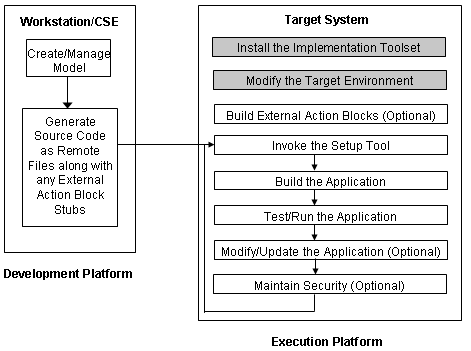
For information about environment settings that must be set before use, see the DBMS software documentation.
To successfully implement an application on a target system, you must have the appropriate levels of access to the volumes, subvolumes, and files being used by the Implementation Toolset.
To facilitate application security, the CA Gen administrator super user must own all IT runtime subvolumes, Setup Tool subvolumes, and files. The IT runtime and Build Tool directories containing the deliverables for NonStop SQL/MX must also be owned by the super user.
Note: For more information about installing IT, Setup Tool, and Build Tool, see the Distributed Systems Installation Guide.
A number of user modifiable files are delivered with the IT. These files include initialization files, sample files, and user exit files.
Important! You are responsible for retaining changes to the user modifiable files in case you reinstall the existing installation so that changes are not lost.
The following modifiable files are delivered with the CA Gen IT that supports NonStop SQL/MP:
The following modifiable files are delivered with the CA Gen IT that supports NonStop SQL/MX:
|
Copyright © 2015 CA Technologies.
All rights reserved.
|
|