

To add a watch on a variable, select a variable name from the Variable Name list (for example, Group View—InGROUP), right-click, and select Create Watch Expression from the pop-up menu.
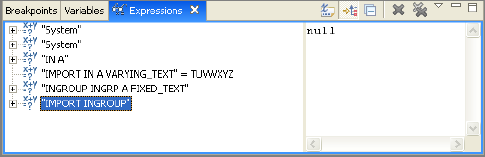
The Diagram Trace Utility adds an expression to the Expressions view for the selected variable and brings the Expressions view to the front of the display (or opens the view if it is not displayed).
|
Copyright © 2013 CA.
All rights reserved.
|
|