

The Variables View displays information on the values of variables in a selected stack frame. The variables displayed in the view include CA Gen Action Diagram system variables and import, export, entity, and local view data for all views currently in scope. The variables are organized in a tree structure that lets you move down to the lowest level object value that is displayed. You can expand and collapse the tree structure as needed.
The following sample Variables View shows the names of the different types of variables in the Variable Name pane and shows the value of the selected variable in the optional Value Detail Pane. You can select multiple variables.
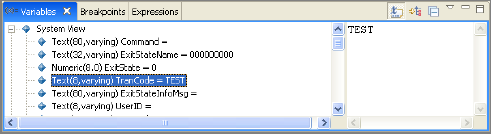
In the Variable Name pane, you can inspect and modify CA Gen Action Diagram system variables and add variable values to the Expressions view. In addition, you can add watchpoints and can toggle watchpoints to enable breakpoints that are based on the changing values of variables.
Note: The value of the BLOB attribute is not shown in the Variables View. The following format represents the BLOB attribute value:
{BLOB;maxlength=nnnn;length=nnnn}
Specifies the BLOB variable.
Specifies the maximum length of the BLOB variable.
Specifies the actual length of the BLOB variable.
|
Copyright © 2013 CA.
All rights reserved.
|
|