

You can open an undisplayed view as needed.
Follow these steps:
A list of views is displayed as shown in the following illustration:
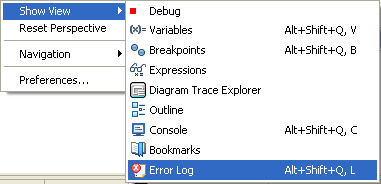
The selected view is displayed in the main window.
Note: If you use the Alt+Shift+Q key sequence to open a view instead of selecting the Show View option from the Windows menu, a pop-up menu appears that lets you select and open the following views:
Note: The Diagram Trace utility does not support the Problems view.
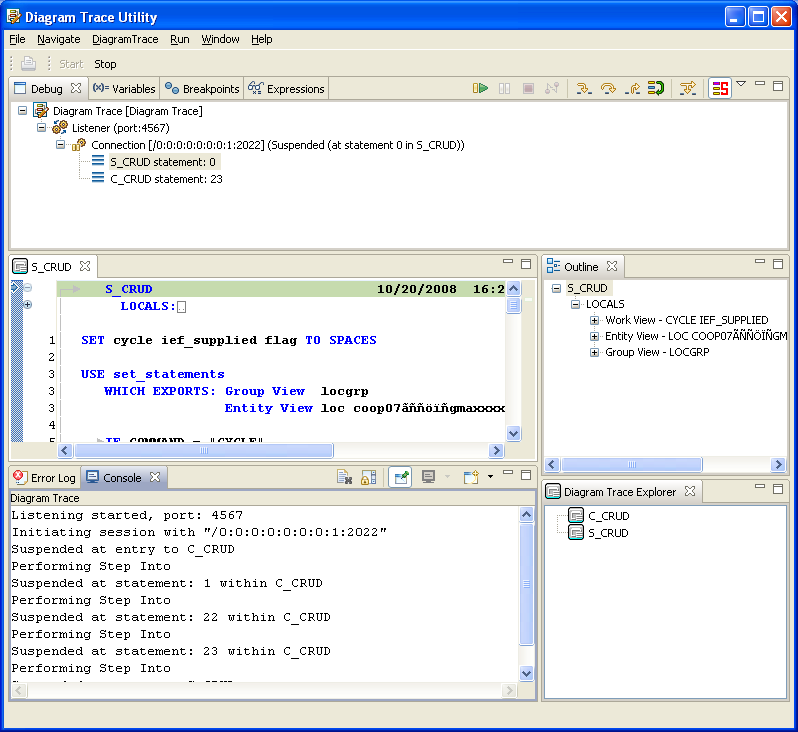
Example: If you select Console, the utility displays the Console view in the Diagram Trace Utility main window. The following illustration shows the Console view added to the bottom of the main window. The Console view tab is highlighted, indicating that the view is the active view.
|
Copyright © 2013 CA.
All rights reserved.
|
|