

The Bookmarks view displays all anchors (bookmarks) placed on a specific line of PAD code. The following illustration shows a sample Bookmarks view.
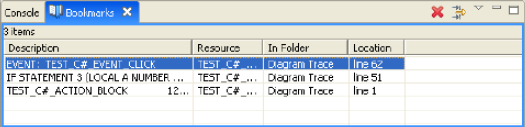
The bookmarks appear in a table format that provides a description of each bookmark, the name of the bookmark's resource, folder, and line number (location) in the PAD Code View editor.
Note: This view is not displayed in the default perspective. You must manually open the view by selecting Window, Show View, and Bookmarks on the Diagram Trace Utility main menu bar.
|
Copyright © 2013 CA.
All rights reserved.
|
|