

Navigating the Diagram Trace Utility › PAD Code View Editors › Tile PAD Code View Editors
Tile PAD Code View Editors
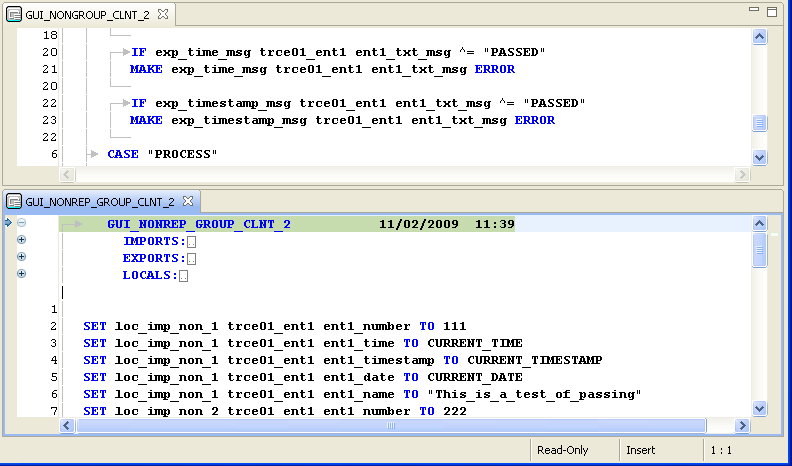
You can create two or more sets of PAD Code View editors in the PAD view editor area. You can also resize the PAD Code View editor area, but you cannot drag views into the PAD Code View editor area.
Follow these steps:
- Open at least two PAD Code View editors in the Editor area by double-clicking editable files in one of the navigation views and drag one of the editor's tabs out of the PAD Code View editor area.
Note: The restricted cursor displays if you try to drop the editor on top of any view or outside the Diagram Trace Utility window.
- Dock the editor on a directional arrow drop cursor so that two editors appear in the editor area.
Note: You can resize each editor and the entire Editor area to accommodate the editors and views as necessary.
- (Optional) Observe the color of the editor tabs.
- Blue—Indicates that the editor is currently active.
- Default color (depends on the system color scheme)—Indicates that the editor was the last active editor. If there is an active view, it is the editor that the active view is currently working with. This is important when working with views such as the Outline and Variables view that work closely with the editor.
Example: The following illustration shows a layout of tiled editors:
Copyright © 2013 CA.
All rights reserved.
|
|