

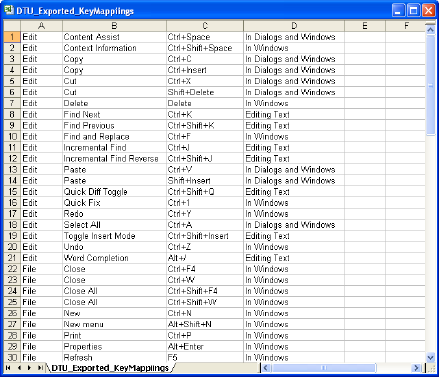
You can export the key mapping preferences to an Excel spreadsheet and save it in an Excel comma separated value (*.csv) file format.
Note: The Diagram Trace Utility contains a key mappings feature, which provides the ability to modify key assignments. This feature is inherited from the Eclipse Platform. The functionality of these key mappings has not been certified.
Follow these steps:
The Preferences dialog appears.
The Keys Preferences View tab appears in the right pane and displays a list of the default key mappings for all commands and actions.
The Windows Save As dialog appears.
The exported key mappings are saved to a file in an Excel Comma Separated Values (*.csv) formatted file in the location you specified.
Example: The following illustration shows an exported key mappings file:
The Preferences dialog closes.
|
Copyright © 2013 CA.
All rights reserved.
|
|