

When you select WAR from the EAR File Assemble Details panel, the following dialog appears:
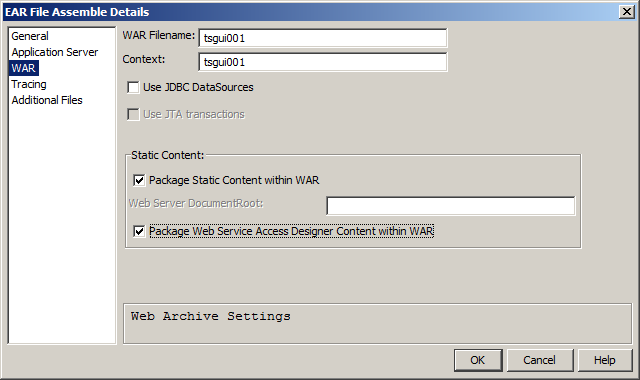
The fields in the WAR dialog are as follows:
Specifies the name of the WAR file to be created. The length of the WAR file name and directory path cannot exceed 255 characters. The default is the local model name.
Specifies the name that is to be used to access the generated application. For example, if Context is set to myapp and has a trancode of menu, the application would be started with the following URL:
http://hostname.com/myapp/menu.jsp
If selected, an Application Server Resource Adapter is generated and placed in the WAR file deployment descriptor. The required information for the adapter is taken from the DBMS connection information that is specified in the Windows Build Tool Setup file using these tokens:
If selected, the Java Web Clients use the Java Transaction API to manage the database connection and transaction control (two phased commit). This applies to those applications whose Java Web Clients access more than one database in a single client procedure step.
J2EE Application Servers can perform DBMS connections as part of a two phase commit Java transaction.
Note: Not all application servers support this feature.
This feature does not allow the Java Web Client and EJB servers to participate in a distributed transaction. CA Gen does not allow such distributed transactions to be designed.
If the Java Web Client is enabling threads, then the client is not allowed to participate in the JTA transaction. By disabling threading, the Java Web Client is prevented from utilizing Java Beans in the user interface.
Note: This field is available only if Use JDBC DataSources is selected, and Enable Threading is cleared on the Web Gen Client dialog.
If selected, all dynamic and static content is packaged in the WAR file. Otherwise, only the dynamic content (JSPs and JAR files) is packaged in the WAR file, while the static content (HTML, JavaScript, GIFs) is copied to the document root of the web server.
Higher performance may be achieved by clearing this option and providing a static content location using the Web Server DocumentRoot field.
Specifies the root document. This must be the root document of the Web server.
If Apache is being used, the document root is <APACHE_HOME>/htdocs.
If IIS is being used, the document root is <IIS_HOME>/wwwroot.
This field is available only when Package Static Content within WAR is cleared, that is, you have chosen to separate the static and dynamic content.
Includes the generated files, which are the Action Steps directory and all its subdirectories, in the Web View application WAR file.
Default: Selected
|
Copyright © 2015 CA Technologies.
All rights reserved.
|
|