

In an online system, information sometimes needs to be preserved between procedure step executions. Of course, every field that both comes from an export data view and goes to an import data view can be considered “saved” because it passes between procedure steps without a user retyping it.
The following illustration shows this.
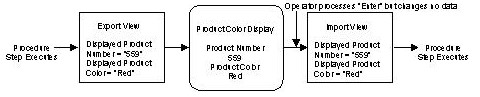
However in some cases, information needs to be preserved but not displayed to the user. You will most often do this by using the hidden field property.
A hidden field is not displayed, but is still passed from export to import view between transaction executions. The following illustration shows an example of a procedure step using a hidden field to pass data between executions.
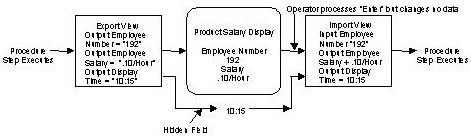
In this example, a secure procedure step has been designed to require a user password. Whenever the screen is displayed, the Output Display Time is saved as a hidden field. When the user presses Enter to start the next procedure step execution, the value of Output Display Time saved in the hidden field is compared with the current time. If the user lets too much time to elapse, the procedure step can prompt for a password.
Traditionally, hidden fields are implemented as dark, protected fields on the screen.
At execution time, the CA Gen-generated system automatically saves hidden fields and restores them without requiring space on the screen.
CA Gen imposes the following requirements:
|
Copyright © 2013 CA.
All rights reserved.
|
|