

In screen design, a field implements an attribute for which an export data view, and optionally an import data view, has been defined for the procedure step. The attribute may belong either to an entity type or it may be a work attribute.
You need to understand the relationship between screen fields and import and export data views before addressing the properties of fields on screens.
The single screen associated with each procedure step is responsible for providing data to its import view and displaying data from its export view. You can use each field on the screen to implement both an import and an export view of an attribute. The following illustration shows this point.
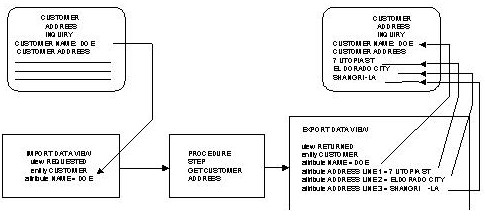
The following list details the keys to the illustration:
After the terminal user has specified the data required in the import view
After the system has formatted the export view in response
The following list shows the properties of fields:
|
Copyright © 2013 CA.
All rights reserved.
|
|