

Configuring Your Product › Customization Options › Customizing the TSO/ISPF Auto-Restore Environment
Customizing the TSO/ISPF Auto-Restore Environment
This section applies only if you have installed the catalog management hook. If you have installed the hook but have not attempted any restores from a TSO/ISPF environment, do so at this time. It is much easier to conceptualize the modifications about to be described if you are familiar with how the support works in its default mode.
In its default mode, the TSO/ISPF user is prompted for answers to the following questions:
- DO YOU WANT TO RESTORE THE DATA SET? (yes/no) If the user replies anything other than no, the next question is asked.
- DO YOU WANT AN IMMEDIATE OR A DEFERRED RESTORE? (I/D) If the user responds anything other than deferred, the next question is asked.
- DO YOU WANT TO WAIT FOR THE RESTORE TO COMPLETE? (yes/no) If the user answers no, the terminal will be unlocked and the user is notified when the restore is complete. If the user responds anything other than no, the terminal remains locked until the restore is complete, unless a tape mount is required (and allowed by sysparm ARTAPEOK). If a tape mount is required, the user is prompted one more time with the following question:
- DATA SET IS ARCHIVED TO TAPE. DO YOU STILL WANT TO WAIT? (no/yes) If the user responds yes, the terminal is remain locked until the restore is complete. If the user responds anything other than yes, the terminal will unlock and the user will be notified when the restore is complete. The Auto-Restore task begins before the user responds to this prompt, and the response has no effect on the progress of the Auto-Restore job.
- A WAIT RESPONSE WILL SUSPEND YOUR SESSION. DO YOU WANT TO WAIT (Y?N)? This message allows the TSO user another option in the wait process in instances where another task is restoring the data set.
This series of questions can be very confusing to some users. To suppress any or all of the questions, you can. Installing user exit USERMOD8 by performing the following procedure does this.
To install user exit USERMOD8
- Locate the source for ADSUMOD8 in the library associated with the CCUWSAMP DDDEF. The following illustration is a sample source for ADSUMOD8:
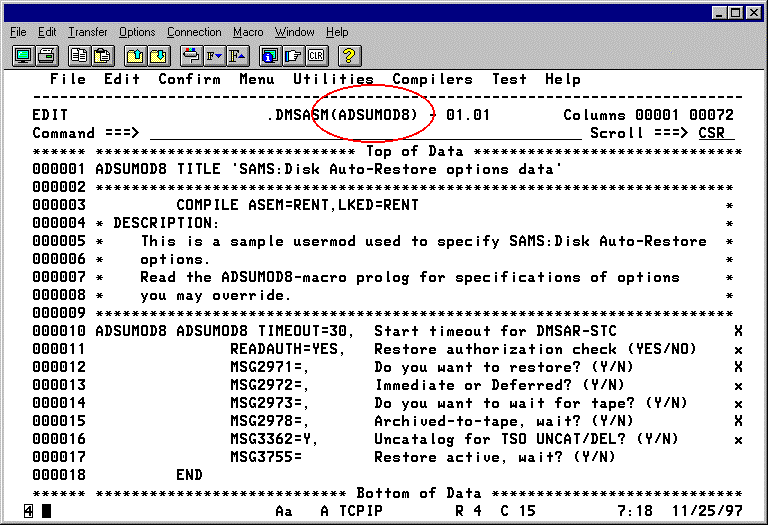
- In order to ensure that the changes you make to ADSUMOD8 are protected during future CA Disk installs or maintenance, copy this member into the source library associated with the //USERASM dd statement in USERMOD8.
- Customize ADSUMOD8 as follows:
- The TIMEOUT= parameter defaults to 30 seconds before the STC passes control back to the USERID. After this wait period is exceeded, message 2977 is issued and the TSO user (or console operator in the case of a batch job) is asked if the Auto-Restore should be terminated. A Y response terminates the Auto-Restore. Any other response extends the wait period an additional 30 seconds. If your installation is prone to resource conflicts that slow task initiation, consider increasing this wait period and eliminate this additional prompt. Increasing the value of this parameter can do this.
- The READAUTH= parameter defaults to YES forcing DMSAR to invoke a SAF check for Read authority based on the USERID invoking the Auto-Restore prior to starting the DMSAR STC without regard to the setting of sysparm ARSECURE.
- Specifying NO bypasses this security prior to starting the DMSAR STC. In CA ACF2, or depending upon the setting of ARSECURE sysparm in a RACF or CA Top Secret Security environment, the data set could be restored when the USERID requesting the restore had no read authority to the data set. Although this causes no real security exposure, it does waste resources. It is not recommended that customers modify this value in the ADSUMOD8 source unless they encounter a specific security situation where they need this ability.
- For more details of security protection during Restore for all security interfaces, see the section Security Processing in the Systems Guide.
- The MSGnnnn= parameters are used to customize the default responses to the TSO prompts. Specify Y to pre-answer the TSO response as YES. Specify a N to pre-answer the TSO response as NO. Specifying the null parameter causes auto-restore to prompt the TSO user for a response. For MSG=2972, specify an I to pre-answer an immediate restore, a D to pre-answer a deferred restore, or the null parameter causes auto-restore to prompt the TSO user for a response.
- Save your work by issuing SAVE at the TSO command line.
Copyright © 2015 CA Technologies.
All rights reserved.
|
|